Companion Mobile

MOBILE, APP-BASED FIXTURE CONFIGURATION & DIAGNOSIS TOOL

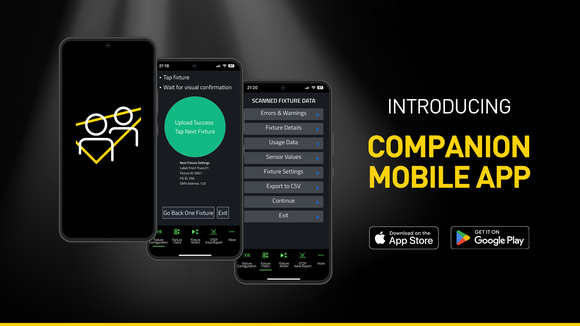
Companion Mobile là phiên bản ứng dụng di động của công cụ quản lý fixture, tải firmware và lập trình độc lập Companion. Ứng dụng tương thích với các fixture Martin có hỗ trợ NFC (Near Field Communication), bao gồm MAC Viper XIP, MAC Aura Raven XIP, MAC Encore Two, ELP Manet 8F và nhiều fixture khác dự kiến sẽ được bổ sung trong tương lai. Ứng dụng miễn phí này có sẵn cho các thiết bị di động iOS và Android.

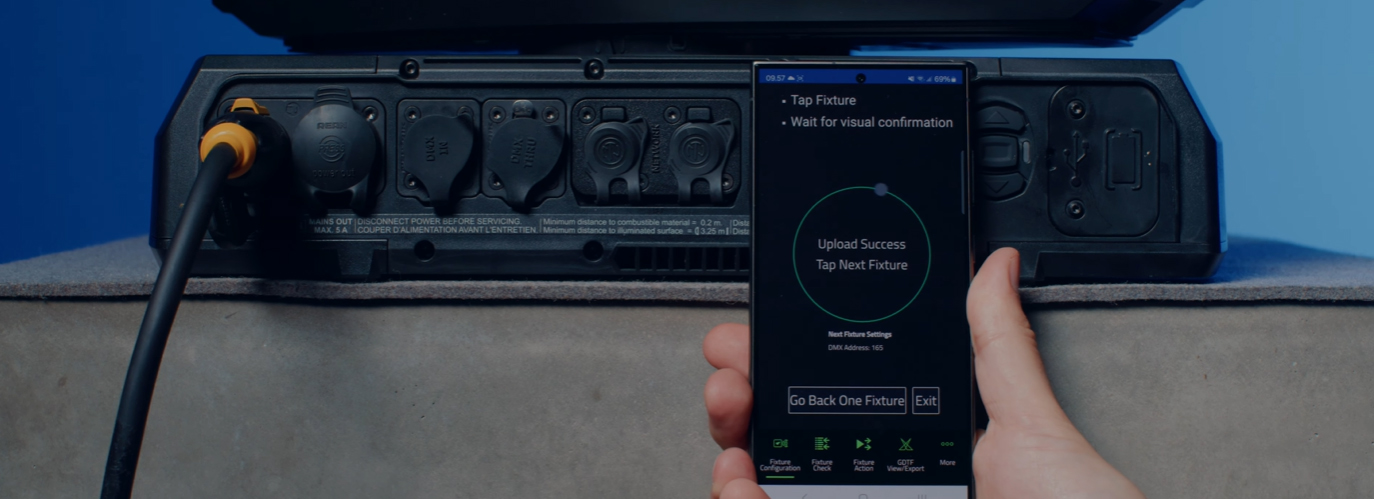
Tuy tương tự ứng dụng Companion Desktop quen thuộc, Companion Mobile sử dụng NFC để thiết lập kết nối không dây, giúp việc cấu hình fixture trở nên đơn giản và dễ dàng hơn nữa. Ưu điểm của giao tiếp NFC là có thể cấu hình fixture mà không cần cấp nguồn cho thiết bị. Ngay cả khi fixture vẫn còn nằm trong flightcase, chỉ cần chạm smartphone vào màn hình của fixture là đã có thể tiến hành cấu hình.

Phiên bản 1.0.0 của Companion Mobile mang đến bốn tính năng chính, cùng với các tính năng bổ sung dự kiến trong những bản phát hành sau. Bao gồm công cụ Fixture Configure để dễ dàng thay đổi thiết lập của fixture, công cụ Fixture Check để chẩn đoán fixture nhanh chóng, công cụ Fixture Action để khởi chạy các tác vụ fixture đơn giản và GDTF View & Export để duyệt các tệp GDTF do Martin tạo nhằm tra cứu thông tin chi tiết của fixture.

Companion Mobile đồng bộ hóa với thư viện của Martin qua Internet, loại bỏ nhu cầu tải xuống thủ công. Ngoài ra, ứng dụng còn tự động đồng bộ hóa với các tệp GDTF do Martin tạo trên kho GDTF Share. Nhờ đó, người dùng có thể truy cập toàn bộ thông tin chi tiết của fixture như DMX Modes, DMX Channel Listings, Gobo Loadouts và nhiều thông số khác. Các tệp GDTF có thể được xuất trực tiếp từ Companion để sử dụng với bất kỳ phần mềm tương thích GDTF nào.

Bạn cũng có thể tham khảo Companion Desktop, phiên bản cung cấp một số tính năng tương tự cho máy tính chạy Windows.

Video


Tính năng

  • Compatible with Martin NFC-enabled fixtures, including MAC Viper XIP, MAC Aura Raven XIP, MAC Encore Two, ELP Manet 8F and many more fixtures to come
  • Automatic online synchronization of fixture database and GDTF library
  • Fixture Configure offers the ability to easily change the settings of one or multiple fixtures at once
  • Fixture Check enables the ability to quickly diagnose fixtures and export data to a CSV file
  • Fixture Action allows common tasks to be executed with a single click
  • Capability to read all data from fixtures, even when they are powered off
  • Capability to configure fixtures, even before powering them up
  • Includes an integrated GDTF viewer and export tool

Thông số kỹ thuật

  • System Requirements

    Android: Version 12 or newer
    iOS: Version 13 or newer
    Storage: 250 MB available storage space

    Supported Fixture Communication Protocols NFC
    Supported NFC Parameters

    Fixture Configuration
    Patch: Label, Fixture ID, P3 ID, DMX Mode, DMX Address, DMX Universe, Compact Mode Aura, Pan Invert, Tilt Invert, Pan/Tilt Swap, PixelFlip, IP Address, Subnet Mask
    Universal Connect Module: SHoW ID, SHoW Key, Output Power, Antenna Type, RSSI, RX Quality, Connection State, Module Manufacturer, Module Model, Module Firmware
    Light and Colour: Dimmer Curve, Color Mode, Color Boost, Output Mode, Manual CTC, Manual Tint, Keylight Calibration, Gobo CT Correction, End Compensation, Video Tracking, Strobe Behavior, Tungsten Emulation
    Control: FollowSpot Mode, Pan/Tilt Speed, Effects Speed, Effects Shortcuts, Focus Tracking, Framing Mode, HyperZoom, Fan Mode, Cooling Mode, Studio Mode, BeamShaper, Fan Clean
    Display: Display, Display Show Errors, Display Rotation, Display Intensity, Display Contrast
    Power: Power Limit, Hibernation, Offline Mode, Stand-Alone Mode, Reset via DMX
    Outdoor: Auto Empty Water, Outdoor Actions
    Pan/Tilt Limits: Reset Pan/Tilt Limits, Enable Pan/Tilt Limits, Pan Limit Min, Pan Limit Max, Tilt Limit Min, Tilt Limit Max
    Details: Serial Number, RDM UID, MAC Address, RDM Protocol Version, RDM Device Model ID, Art-Net OEM Code, Product Category, Firmware Version, Sub-Device Count
    Service: SelfTest, Device Hours Total, Device Hours Resettable, Lamp Hours Total, Lamp Hours Resettable, Power Cycles Total, Power Cycles Resettable, Fixture Length

    Fixture Check
    Fixture Details: Serial Number, RDM UID, MAC Address, Firmware Version, RDM Device Model ID, Art-Net OEM Code
    Errors and Warnings: Error Messages, Warning Messages
    Usage Data: Device Hours Total, Device Hours Resettable, Lamp Hours Total, Lamp Hours Resettable, Power Cycles Total, Power Cycles Resettable
    Sensor Values: Temperatures, Fan Speeds
    Fixture Settings: same as fixture configuration

    Fixture Action
    Factory Defaults: Set Factory Defaults
    Reset Fixture: Warm Reset, Cold Reset
    Hibernation: Disable, Enable
    IP Settings: Reset IP Settings
    Pan/Tilt Limits: Reset Pan/Tilt Limits
    Outdoor Actions: Stop, Empty Head, Dry Off, Safe Parking
    Fan Clean: Stop, Start
    SelfTest: Stop, Test All, Test Pan/Tilt, Test Effects, Test LEDs, Identify
    Reset Counters: Reset Device Hours, Reset Lamp Hours, Reset Power Cycles

    * Not all parameters are supported by all fixtures

    Supported Fixtures - Fixture Configuration

    - ELP Manet 8F
    - MAC Aura Raven XIP
    - MAC Encore Two
    - MAC Viper XIP

  • Supported Fixtures - Fixture Check

    - ELP Manet 8F
    - MAC Aura Raven XIP
    - MAC Encore Two
    - MAC Viper XIP

    Supported Fixtures - Fixture Action

    - ELP Manet 8F
    - MAC Aura Raven XIP
    - MAC Encore Two

    - MAC Viper XIP

    Supported Fixtures - GDTF View & Export All Martin products
    Related Items

    Companion Desktop Software: Free download from www.martin.com

    Ordering Information

    Companion Mobile Software: Free download from App Store and Google Play

Tải xuống

Software
  Phiên bản Kích thước Đã tải lên
iOS download icon Companion Mobile - iOS (App Store)
phiên bản 1.0.3, phát hành: Thg 5 2025
1.0.3   Thg 5 2025
Android download icon Companion Mobile - Android (Play Store)
phiên bản 1.0.3, phát hành: Thg 5 2025
1.0.3   Thg 5 2025
Android download icon Companion Mobile - Android (Manual Installation)
phiên bản 1.0.3, cập nhật: Thg 4 2026
1.0.3   100 MB Thg 4 2026

Nếu bất kỳ liên kết nào ở trên hiển thị ký tự lạ trong trình duyệt của bạn, vui lòng nhấp chuột phải vào tệp để lưu vào máy tính của bạn.

Tin tức

HARMAN Pro Insights

Hỗ trợ/FAQ