Companion Mobile

MOBILE, APP-BASED FIXTURE CONFIGURATION & DIAGNOSIS TOOL

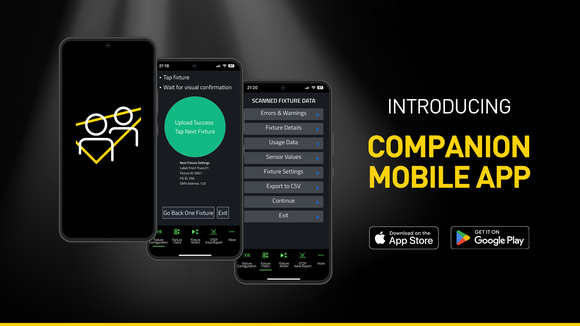
Companion Mobile គឺជាកំណែជាកម្មវិធីទូរស័ព្ទនៃឧបករណ៍ Companion សម្រាប់ការគ្រប់គ្រងឧបករណ៍បញ្ចាំងភ្លើង ការបញ្ចូលហ្វើមវែរ និងការសរសេរកម្មវិធីជាបែបឯករាជ្យ។ វាឆបគ្នាជាមួយឧបករណ៍បញ្ចាំងភ្លើងរបស់ Martin ដែលដំណើរការជាមួយ NFC (Near Field Communication) រួមមាន MAC Viper XIP, MAC Aura Raven XIP, MAC Encore Two, ELP Manet 8F និងឧបករណ៍ជាច្រើនទៀតដែលបានគ្រោងទុកសម្រាប់អនាគត។ កម្មវិធីឥតគិតថ្លៃនេះមានសម្រាប់ឧបករណ៍ចល័ត iOS និង Android។

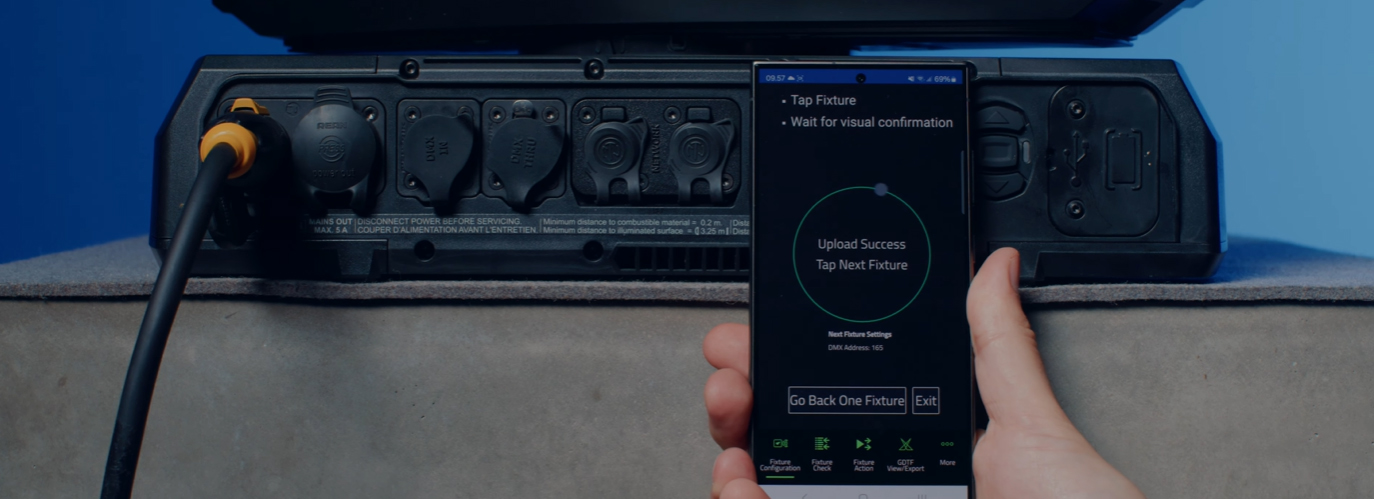
ថ្វីត្បិតស្រដៀងទៅនឹងកម្មវិធី Companion Desktop ដ៏ពេញនិយមក៏ពិតមែន ប៉ុន្តែ Companion Mobile ប្រើប្រាស់ NFC ដើម្បីបង្កើតការទំនាក់ទំនងឥតលួស ដែលធ្វើឱ្យការកំណត់រចនាសម្ព័ន្ធឧបករណ៍បញ្ចាំងភ្លើងកាន់តែសាមញ្ញ និងងាយស្រួលថែមទៀត។ អត្ថប្រយោជន៍នៃចំណុចប្រទាក់ NFC គឺថាឧបករណ៍អាចត្រូវបានកំណត់រចនាសម្ព័ន្ធដោយមិនចាំបាច់បើកថាមពលឡើយ។ ទោះបីជាឧបករណ៍នៅតែស្ថិតនៅក្នុងហ្វ្លាយខេស (flightcase) ក៏ដោយ គ្រាន់តែប៉ះទូរស័ព្ទស្មាតហ្វូនទៅលើអេក្រង់របស់ឧបករណ៍ ជាការស្រេចសម្រាប់ការកំណត់រចនាសម្ព័ន្ធឧបករណ៍។

កំណែ 1.0.0 នៃ Companion Mobile នាំមកជាមួយមុខងារសំខាន់ៗចំនួនបួន ដោយមានមុខងារបន្ថែមទៀតដែលបានគ្រោងទុកសម្រាប់ការចេញផ្សាយនាពេលអនាគត។ មុខងារទាំងនោះរួមមាន Fixture Configure សម្រាប់ការផ្លាស់ប្តូរការកំណត់ឧបករណ៍យ៉ាងងាយស្រួល, Fixture Check សម្រាប់ការវិនិច្ឆ័យបញ្ហាឧបករណ៍យ៉ាងរហ័ស, Fixture Action សម្រាប់ការចាប់ផ្តើមសកម្មភាពឧបករណ៍សាមញ្ញៗ និង GDTF View & Export សម្រាប់ការរុករកឯកសារ GDTF ដែលផលិតដោយ Martin ដើម្បីស្វែងរកព័ត៌មានលម្អិតអំពីឧបករណ៍។

Companion Mobile ធ្វើសមកាលកម្មជាមួយបណ្ណាល័យរបស់ Martin តាមរយៈអ៊ីនធឺណិត ដោយលុបបំបាត់តម្រូវការទាញយកដោយដៃ។ លើសពីនេះ វាធ្វើសមកាលកម្មដោយស្វ័យប្រវត្តិជាមួយឯកសារ GDTF ដែលផលិតដោយ Martin នៅលើ GDTF share។ ការនេះផ្តល់លទ្ធភាពចូលមើលព័ត៌មានលម្អិតទាំងអស់របស់ឧបករណ៍ ដូចជា DMX Modes, DMX Channel Listings, Gobo Loadouts និងច្រើនទៀត។ ឯកសារ GDTF អាចត្រូវបាននាំចេញដោយផ្ទាល់ពី Companion សម្រាប់ប្រើប្រាស់ជាមួយកម្មវិធីណាមួយដែលឆបគ្នាជាមួយ GDTF។

សូមមើលផងដែរ Companion Desktop ដែលផ្តល់ជូនមុខងារស្រដៀងគ្នាមួយចំនួនសម្រាប់កុំព្យូទ័រដែលដំណើរការលើ Windows។

វីដេអូ


លក្ខណៈពិសេស

  • Compatible with Martin NFC-enabled fixtures, including MAC Viper XIP, MAC Aura Raven XIP, MAC Encore Two, ELP Manet 8F and many more fixtures to come
  • Automatic online synchronization of fixture database and GDTF library
  • Fixture Configure offers the ability to easily change the settings of one or multiple fixtures at once
  • Fixture Check enables the ability to quickly diagnose fixtures and export data to a CSV file
  • Fixture Action allows common tasks to be executed with a single click
  • Capability to read all data from fixtures, even when they are powered off
  • Capability to configure fixtures, even before powering them up
  • Includes an integrated GDTF viewer and export tool

លក្ខណៈពិសេស

  • System Requirements

    Android: Version 12 or newer
    iOS: Version 13 or newer
    Storage: 250 MB available storage space

    Supported Fixture Communication Protocols NFC
    Supported NFC Parameters

    Fixture Configuration
    Patch: Label, Fixture ID, P3 ID, DMX Mode, DMX Address, DMX Universe, Compact Mode Aura, Pan Invert, Tilt Invert, Pan/Tilt Swap, PixelFlip, IP Address, Subnet Mask
    Universal Connect Module: SHoW ID, SHoW Key, Output Power, Antenna Type, RSSI, RX Quality, Connection State, Module Manufacturer, Module Model, Module Firmware
    Light and Colour: Dimmer Curve, Color Mode, Color Boost, Output Mode, Manual CTC, Manual Tint, Keylight Calibration, Gobo CT Correction, End Compensation, Video Tracking, Strobe Behavior, Tungsten Emulation
    Control: FollowSpot Mode, Pan/Tilt Speed, Effects Speed, Effects Shortcuts, Focus Tracking, Framing Mode, HyperZoom, Fan Mode, Cooling Mode, Studio Mode, BeamShaper, Fan Clean
    Display: Display, Display Show Errors, Display Rotation, Display Intensity, Display Contrast
    Power: Power Limit, Hibernation, Offline Mode, Stand-Alone Mode, Reset via DMX
    Outdoor: Auto Empty Water, Outdoor Actions
    Pan/Tilt Limits: Reset Pan/Tilt Limits, Enable Pan/Tilt Limits, Pan Limit Min, Pan Limit Max, Tilt Limit Min, Tilt Limit Max
    Details: Serial Number, RDM UID, MAC Address, RDM Protocol Version, RDM Device Model ID, Art-Net OEM Code, Product Category, Firmware Version, Sub-Device Count
    Service: SelfTest, Device Hours Total, Device Hours Resettable, Lamp Hours Total, Lamp Hours Resettable, Power Cycles Total, Power Cycles Resettable, Fixture Length

    Fixture Check
    Fixture Details: Serial Number, RDM UID, MAC Address, Firmware Version, RDM Device Model ID, Art-Net OEM Code
    Errors and Warnings: Error Messages, Warning Messages
    Usage Data: Device Hours Total, Device Hours Resettable, Lamp Hours Total, Lamp Hours Resettable, Power Cycles Total, Power Cycles Resettable
    Sensor Values: Temperatures, Fan Speeds
    Fixture Settings: same as fixture configuration

    Fixture Action
    Factory Defaults: Set Factory Defaults
    Reset Fixture: Warm Reset, Cold Reset
    Hibernation: Disable, Enable
    IP Settings: Reset IP Settings
    Pan/Tilt Limits: Reset Pan/Tilt Limits
    Outdoor Actions: Stop, Empty Head, Dry Off, Safe Parking
    Fan Clean: Stop, Start
    SelfTest: Stop, Test All, Test Pan/Tilt, Test Effects, Test LEDs, Identify
    Reset Counters: Reset Device Hours, Reset Lamp Hours, Reset Power Cycles

    * Not all parameters are supported by all fixtures

    Supported Fixtures - Fixture Configuration

    - ELP Manet 8F
    - MAC Aura Raven XIP
    - MAC Encore Two
    - MAC Viper XIP

  • Supported Fixtures - Fixture Check

    - ELP Manet 8F
    - MAC Aura Raven XIP
    - MAC Encore Two
    - MAC Viper XIP

    Supported Fixtures - Fixture Action

    - ELP Manet 8F
    - MAC Aura Raven XIP
    - MAC Encore Two

    - MAC Viper XIP

    Supported Fixtures - GDTF View & Export All Martin products
    Related Items

    Companion Desktop Software: Free download from www.martin.com

    Ordering Information

    Companion Mobile Software: Free download from App Store and Google Play

ការទាញយក

Software
  កំណែ ទំហំ បានផ្ទុកឡើង
iOS download icon Companion Mobile - iOS (App Store)
កំណែ 1.0.3, ចេញផ្សាយ: ឧសភា 2025
1.0.3   ឧសភា 2025
Android download icon Companion Mobile - Android (Play Store)
កំណែ 1.0.3, ចេញផ្សាយ: ឧសភា 2025
1.0.3   ឧសភា 2025
Android download icon Companion Mobile - Android (Manual Installation)
កំណែ 1.0.3, បានធ្វើបច្ចុប្បន្នភាព: មេសា 2026
1.0.3   99.3 MB មេសា 2026

ប្រសិនបើតំណភ្ជាប់ខាងលើបង្ហាញអក្សរចម្លែកក្នុងកម្មវិធីរុករករបស់អ្នក សូមចុចខាងស្តាំលើឯកសារដើម្បីរក្សាទុកទៅកុំព្យូទ័ររបស់អ្នក។

ព័ត៌មាន

HARMAN Pro Insights

Designing Smarter Workflows with Precision Lighting Fixture Management Tools feature

Designing Smarter Workflows with Precision Lighting Fixture Management Tools

    Professional lighting setups demand precise configuration, reliable diagnostics, and up-to-date firmware. Yet DMX addressing, firmware mismatches, and manual data entry often slow down designers, rental houses, and system techs. Effective lighting fixture management tools can eliminate these pain points and keep every show

CONTINUE READING

ការគាំទ្រ/សំណួរញឹកញាប់