M6
បានបញ្ឈប់

រូបភាពធំជាង

Effective 14 March, 2018, Elation Professional has acquired the M-Series range of lighting controllers and software from HARMAN Professional and will now be providing sales and product support. View the announcement from Elation Professional.

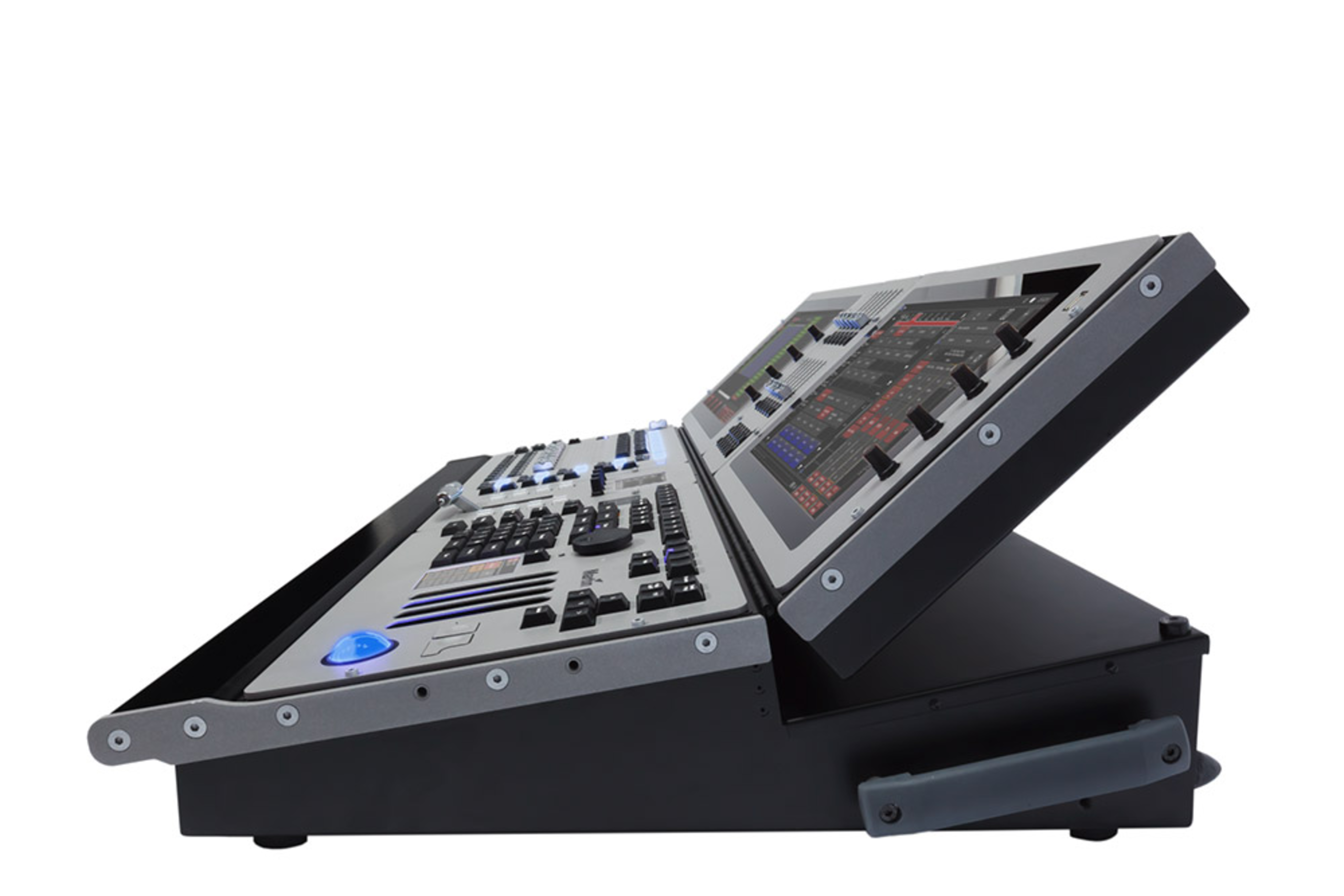
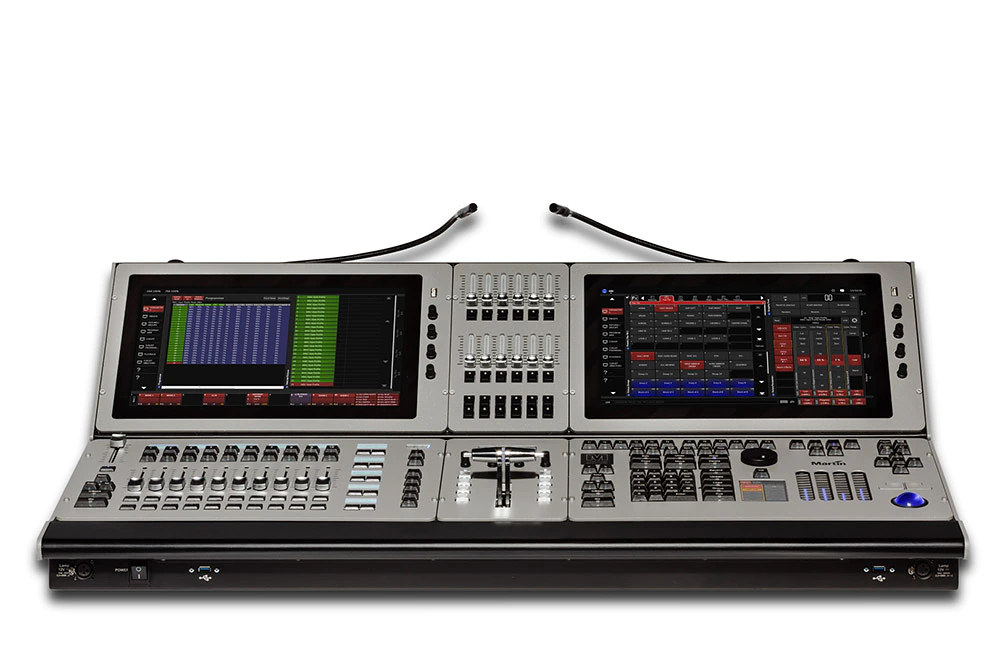
The M6 is a state-of-the-art lighting console that functions as a highly advanced visual control surface. Designed to control everything from conventional and moving lights to the most advanced media server, the M6 has been designed for today’s demanding multimedia shows and tomorrow’s challenges.

Based on the well-proven M-Series software platform, the M6 provides users the ultimate control surface for fast programming and extensive playback control all from one console. Incorporating the latest available technologies with an industrial multi-core processor, solid-state drives and custom-designed high-brightness touch screens, the M6 is capable of delivering 64 DMX universes directly from the console’s network ports without using costly external processors.

Advanced features like a LiveBlender T-Bar, FastDial rotary encoders, Paired Playback buttons and BriteTouch display make the M6 Martin’s most advanced console design ever. It offers a total of 44 playbacks, including dual Main Go sections, 10 motorized faders and 12 additional faders, as well as a total of 17 encoders for parameter access.


The Martin M6 comes standard with a MSD 6 Lite visualizer one-year license on its own separate One-Key for the conveniences of designing and programming offline. More information on MSD at www.martinshowdesigner.com, the same One-Key also contain a M-PC Pro 64 universes license.

  • Dual BriteTouch™ monitor 
  • T-Bar control
  • 44 Playbacks

វីដេអូ


លក្ខណៈពិសេស

  • 2 x positionable BriteTouch™ widescreens (sunlight readable, multi-touch)
  • 2 x external DisplayPort touchscreens up to 1920x1080 per output
  • FastTouch™ 3.5” touchscreens
  • 1 x LiveBlender™ split T-Bar with 8 x FastBlend™ RGB buttons
  • 4 x FastTrack™ linear encoders
  • 12 x FastDial™ rotary encoders
  • 1 x dedicated dimmer wheel
  • 10 x motorized playbacks with LCD displays and 4 x customizable buttons
  • 10 x PlayPairs™ buttons with LCD displays
  • 12 x Sub Playback faders and 12 x Sub Playback buttons
  • 2 x Main Go sections
  • 12 x F-Keys and 5 x FastKeys™
  • Low-profile housing with adaptable module layout
  • Show-ready boot up in under a minute
  • 64 DMX universes directly from the console network ports
  • 1 year MSD 6 Lite license on dedicated One-Key

ព័ត៌មានលម្អិត

លក្ខណៈរូបវន្តប្រវែង៖ 668 មម (26.3 អ៊ីញ)ទទឹង៖ 1058 មម (41.7 អ៊ីញ)កម្ពស់៖ 204 មម (8.1 អ៊ីញ)ទម្ងន់៖ 37.5 គក (82.7 ផោន)ទម្ងន់ដឹកជញ្ជូន (ក្នុងហ្វ្លាយខេស)៖ TBA
ការគ្រប់គ្រង និងការសរសេរកម្មវិធីពិធីការ៖ DMX512A (RDM), Art-Net28 យូនីវើស DMX អាចពង្រីកដល់ 644096 ឆានែល អាចពង្រីកដល់ 32768គ្មានដែនកំណត់លើចំនួនឆានែល DMX ក្នុងមួយឧបករណ៍បំភ្លឺបណ្ណាល័យឧបករណ៍បំភ្លឺយ៉ាងទូលំទូលាយសម្រាប់ក្រុមហ៊ុនផលិតដែលគេស្គាល់ទាំងអស់65000 ការកំណត់ជាមុនសម្រាប់ក្រុមមុខងារនីមួយៗ (P/T, ពណ៌, gobo ជាដើម)ម៉ាស៊ីនបង្កើតបែបផែនសម្រាប់ការសរសេរកម្មវិធីស្វ័យប្រវត្តិនៃបែបផែនស្មុគស្មាញការសរសេរកម្មវិធីបែបប្រែប្រួល (relative) ឬបែបដាច់ខាត (absolute)មុខងារ Fan សម្រាប់ឆានែលទាំងអស់ (រួមទាំងប៉ារ៉ាម៉ែត្រពេលវេលា)ការផ្លាស់ប្ដូរពេលវេលាសកលភ្លាមៗCuelist និម្មិតម៉ាក្រូCue បែប Wait, Follow និង Linkមុខងារ playback បែប HTP, LTP, chase, timecode, submaster និង group masterពេលវេលាប៉ារ៉ាម៉ែត្រនីមួយៗដោយឡែកមុខងារ patch ងាយស្រួលប្រើការក្លូនប្រភេទឧបករណ៍បំភ្លឺឆានែលទាំងអស់មានគុណភាពបំបែក 16-bit
ការគ្រប់គ្រង/ចំណុចប្រទាក់អ្នកប្រើ2 x អេក្រង់ធំ BriteTouch™ 15.6" អាចលៃទីតាំងបាន (អាចអានបានក្រោមពន្លឺថ្ងៃ, ពហុប៉ះ), 1376x7682 x អេក្រង់ប៉ះខាងក្រៅតាម DisplayPort ទាំងពីររហូតដល់ 1920x10802 x អេក្រង់ប៉ះ FastTouch™ 3.5”, 320x2401 x T-bar បែងចែក LiveBlender™8 x ប៊ូតុង FastBlend™ RGB4 x អ៊ិនកូឌ័រលីនេអ៊ែរ FastTracks™ ជាមួយសញ្ញាតបស្នង LED12 x អ៊ិនកូឌ័របង្វិល FastDial™1 x កង់ dimmer ដោយឡែក10 x playback បញ្ជាដោយម៉ូទ័រជាមួយអេក្រង់ LCD និង 4 x ប៊ូតុងអាចប្ដូរតាមបំណងជាមួយអេក្រង់ LCD10 x ប៊ូតុង PlayPairs™ ជាមួយអេក្រង់ LCD12 x ប៊ូតុង sub playback12 x ហ្វេឌ័រ sub playback12 x F-keys5 x Fastkeys™2 x ផ្នែក Main GO ឯករាជ្យការរុករក bank ជាមួយអេក្រង់ឌីជីថលក្ដារលេខប៊ូតុងបញ្ជាTrackball ជាមួយប៊ូតុងជ្រើសរើសពីរ
ការចាក់ដំណើរការ (Playback)កំណត់ cue, cuelist ឬបែបផែនទៅហ្វេឌ័រ playback ណាមួយ500 bank playback ដែលនីមួយៗមាន 20 playback100 bank sub playback ដែលនីមួយៗមាន 24 playback100 ទំព័រនៃ 100 playback ដែលដំណើរការដោយប៊ូតុងលើអេក្រង់ប៉ះគ្មានដែនកំណត់ចំនួន cue ក្នុងមួយ cuelistការ fade 16-bit ពេញលេញសម្រាប់ឧបករណ៍បំភ្លឺគុណភាពខ្ពស់ពេលវេលា fade in/fade out ដោយឡែកសម្រាប់ playback ទាំងអស់អាចបញ្ជាដោយដៃ (override) បានគ្រប់ពេលការ override ផ្ទាល់ 0-100% លើពេលវេលា cue សកលពេលវេលា programmer ផ្ទាល់ (“Sneak”)Cuelist អាចដំណើរការក្នុងរបៀប tracking ឬ non-tracking
ផ្នែករឹងបន្ទះមេ (motherboard) ប្រភេទឧស្សាហកម្ម, ប្រូសេសស័រ Intel Core i7 Quad-Core16 GB RAMឧបករណ៍ផ្ទុក SSD 64 GBប្រូសេសស័រក្រាហ្វិកដោយឡែករហូតដល់ 64 យូនីវើស DMX ដោយផ្ទាល់ពីរន្ធបណ្ដាញរបស់កុងសូល
សូហ្វវែរWindows 7 embeddedការដំឡើង OS តាមឧបករណ៍ផ្ទុក USBការបម្រុងទុកទិន្នន័យសម្ដែងលើ hard disk ឬឧបករណ៍ផ្ទុក USB (មិនរួមបញ្ចូល)គាំទ្រអេក្រង់ប៉ះ ELO USB
ការតភ្ជាប់4 x ច្រកចេញយូនីវើស DMX៖ XLR 5 ម្ជុលមានចាក់សោ1 x ច្រកចូល DMX៖ XLR 5 ម្ជុលមានចាក់សោ2 x អេក្រង់ប៉ះខាងក្រៅ (ទាំងពីររហូតដល់ 1920x1080)៖DisplayPortArt-Net (រហូតដល់ 64 យូនីវើស)៖ Gigabit Ethercon RJ-45តំណភ្ជាប់កុងត្រូល័រ MaxNet៖ Gigabit Ethercon RJ-45ឧបករណ៍ភ្ជាប់ខាងក្រៅ និងឧបករណ៍អង្គចងចាំ USB៖ 2 x USB 3.0, 8 x USB 2.0SMPTE ចូល/ចេញ៖ XLR 3 ម្ជុលមានចាក់សោVITC ចូល/ចេញ៖ BNCMIDI ចូល/ចេញ/thru (MIDI show control, MIDI notes, MIDI timecode)៖ DIN 5 ម្ជុលសំឡេងស្តេរ៉េអូ ចូល/ចេញ៖ XLR 3 ម្ជុលមានចាក់សោមីក្រូហ្វូន៖ XLR 3 ម្ជុលមានចាក់សោ2 x ចង្កៀងតុ (គ្រឿងបន្លាស់ជាជម្រើស)៖ XLR 3 ម្ជុលមានចាក់សោច្រកចូលថាមពល AC៖ Neutrik PowerCon
អគ្គិសនីថាមពល AC៖ 100-240 V នាមក, 50/60 Hzចរន្តអតិបរមា៖ 4 A នៅ 115 V, 2 A នៅ 230 V
សម្ភារៈរួមបញ្ចូលMartin One-Key™ ជាមួយអាជ្ញាបណ្ណ Martin ShowDesigner 6 Pro™ រយៈពេលមួយឆ្នាំ និងអាជ្ញាបណ្ណ Martin™ M-PC 8 យូនីវើសឧបករណ៍ភ្ជាប់ច្រកចូលថាមពល Neutrik PowerCon NAC3FCA, ភ្ជាប់ខ្សែ៖ P/N 053428042 x ចង្កៀងតុ LED រួមបញ្ចូលស្រាប់ដ្រាយ USB flash សម្រាប់សង្គ្រោះប្រព័ន្ធគម្របការពារធូលីសម្រាប់ M6៖ P/N 91613111
គ្រឿងបន្លាស់ម៉ូឌុល M-Series™ Top Submaster Narrow៖ P/N 91613105ម៉ូឌុល M-Series™ Top Transition៖ P/N 91613107ម៉ូឌុលអេក្រង់ប៉ះ M-Series™ 15.6"៖ P/N 91613108បន្ទះម៉ោន VESA M-Series™ សម្រាប់ម៉ូឌុលអេក្រង់ប៉ះ៖ P/N 91613109ចង្កៀងតុ LED, XLR មានមុំ, 13"៖ P/N 91613090ចង្កៀងតុ LED, XLR មានមុំ, 18.5"៖ P/N 91613037ហ្វ្លាយខេស Martin™ M6៖ P/N 91535080Martin™ M-PC 2U / M-DMX៖ P/N 90737070
សម្ភារៈពាក់ព័ន្ធម៉ូឌុល M-Series Submaster៖ P/N 90732170ម៉ូឌុល M-Series Playback II៖ P/N 90732190Martin™ M-Touch៖ P/N 90737040Martin™ M-Play៖ P/N 90737030
ព័ត៌មានអំពីការបញ្ជាទិញកុងត្រូល័រ M6 ក្នុងហ្វ្លាយខេស ជាមួយ 64 យូនីវើស៖ P/N 90737050
ការទាញយក

Specifications
  ភាសា ទំហំ បានផ្ទុកឡើង
file type icon M6 Spec Sheet-English
en បានធ្វើបច្ចុប្បន្នភាព: តុលា 2020
en  2.18 MB តុលា 2020
Compliances
  កំណែ ភាសា ទំហំ បានផ្ទុកឡើង
file type icon M1 ts, M1 HD, M6, MaxModules - ETL Authorization to Mark
កំណែ D, បានធ្វើបច្ចុប្បន្នភាព: ឧសភា 2018
  337 KB ឧសភា 2018
file type icon M1 and M6 Controllers - ETL Authorization to Mark
កំណែ C, បានធ្វើបច្ចុប្បន្នភាព: ឧសភា 2018
  475 KB ឧសភា 2018
file type icon M6- EU Declaration of Conformity
en កំណែ A, បានធ្វើបច្ចុប្បន្នភាព: ឧសភា 2018
en  38.9 KB ឧសភា 2018
Software
  កំណែ ភាសា ទំហំ បានផ្ទុកឡើង
file type icon Martin M6 firmware for release version
en កំណែ 3.70.885, បានធ្វើបច្ចុប្បន្នភាព: ឧសភា 2018
3.70.885  en  189 KB ឧសភា 2018
file type icon Firmware Update Package
en កំណែ C, បានធ្វើបច្ចុប្បន្នភាព: តុលា 2020
en  369 MB តុលា 2020
file type icon M-Series Software
កំណែ 3.70.885, បានធ្វើបច្ចុប្បន្នភាព: មិថុនា 2018
3.70.885    មិថុនា 2018
Service Procedures
  កំណែ ភាសា ទំហំ បានផ្ទុកឡើង
file type icon M6 Digital Belt stiffness problems
en កំណែ A, បានធ្វើបច្ចុប្បន្នភាព: ឧសភា 2018
en  423 KB ឧសភា 2018
Service Notes
  កំណែ ភាសា ទំហំ បានផ្ទុកឡើង
file type icon Martin M6 Firmware Installation Instructions
en កំណែ 3.52.718, បានធ្វើបច្ចុប្បន្នភាព: ឧសភា 2018
3.52.718  en  1.08 MB ឧសភា 2018
Bluetooth Keyboard Support
en កំណែ A, បានធ្វើបច្ចុប្បន្នភាព: ឧសភា 2018
A   en    ឧសភា 2018
file type icon M6 Screen Mount Kit and Accessory Mounts
en កំណែ A, បានធ្វើបច្ចុប្បន្នភាព: ឧសភា 2018
en  3.34 MB ឧសភា 2018
file type icon M6 power cycle reliability improvement
en កំណែ A, បានធ្វើបច្ចុប្បន្នភាព: ឧសភា 2018
en  342 KB ឧសភា 2018
file type icon Adding External Touchscreens
បានធ្វើបច្ចុប្បន្នភាព: ធ្នូ 2017
    ធ្នូ 2017
file type icon SMPTE Level Requirements
បានធ្វើបច្ចុប្បន្នភាព: ធ្នូ 2017
    ធ្នូ 2017
Tech Notes
  ទំហំ បានផ្ទុកឡើង
file type icon Bluetooth Keyboard Support
បានធ្វើបច្ចុប្បន្នភាព: ធ្នូ 2017
ធ្នូ 2017
Hints and Tips
  កំណែ ភាសា ទំហំ បានផ្ទុកឡើង
file type icon Decimal to ArtNet Universe Conversion Table
en កំណែ A, បានធ្វើបច្ចុប្បន្នភាព: តុលា 2020
en  78.5 KB តុលា 2020
Adding External Touchscreens
en កំណែ A, បានធ្វើបច្ចុប្បន្នភាព: ឧសភា 2018
A   en    ឧសភា 2018
SMPTE level requirements
en កំណែ A, បានធ្វើបច្ចុប្បន្នភាព: ឧសភា 2018
A   en    ឧសភា 2018
Trainings
  កំណែ ភាសា ទំហំ បានផ្ទុកឡើង
M-Series 01: The Interface
en កំណែ A, បានធ្វើបច្ចុប្បន្នភាព: សីហា 2023
A   en    សីហា 2023
M-Series 02: Patch
en កំណែ A, បានធ្វើបច្ចុប្បន្នភាព: សីហា 2023
A   en    សីហា 2023
M-Series 03: Fixtures and Groups
en កំណែ A, បានធ្វើបច្ចុប្បន្នភាព: សីហា 2023
A   en    សីហា 2023
M-Series 05: FX
en កំណែ A, បានធ្វើបច្ចុប្បន្នភាព: សីហា 2023
A   en    សីហា 2023
M-Series 06: Cues and cuelists
en កំណែ A, បានធ្វើបច្ចុប្បន្នភាព: សីហា 2023
A   en    សីហា 2023
M-Series 07: Network
en កំណែ A, បានធ្វើបច្ចុប្បន្នភាព: សីហា 2023
A   en    សីហា 2023
file type icon M-Series 01: The Interface
បានធ្វើបច្ចុប្បន្នភាព: ធ្នូ 2017
    ធ្នូ 2017
file type icon M-Series 02: Patch
បានធ្វើបច្ចុប្បន្នភាព: ធ្នូ 2017
    ធ្នូ 2017
file type icon M-Series 03: Fixtures and Groups
បានធ្វើបច្ចុប្បន្នភាព: ធ្នូ 2017
    ធ្នូ 2017
file type icon M-Series 05: FX
បានធ្វើបច្ចុប្បន្នភាព: ធ្នូ 2017
    ធ្នូ 2017
file type icon M-Series 06: Cues and cuelists
បានធ្វើបច្ចុប្បន្នភាព: ធ្នូ 2017
    ធ្នូ 2017
file type icon M-Series 07: Network
បានធ្វើបច្ចុប្បន្នភាព: ធ្នូ 2017
    ធ្នូ 2017
Firmware
  ទំហំ បានផ្ទុកឡើង
download icon for M-Series Firmware Update Program M-Series Firmware Update Program
ចេញផ្សាយ: កក្កដា 2020
369 MB កក្កដា 2020

ប្រសិនបើតំណភ្ជាប់ខាងលើបង្ហាញអក្សរចម្លែកក្នុងកម្មវិធីរុករករបស់អ្នក សូមចុចខាងស្តាំលើឯកសារដើម្បីរក្សាទុកទៅកុំព្យូទ័ររបស់អ្នក។

ការគាំទ្រ/សំណួរញឹកញាប់