더 큰 이미지
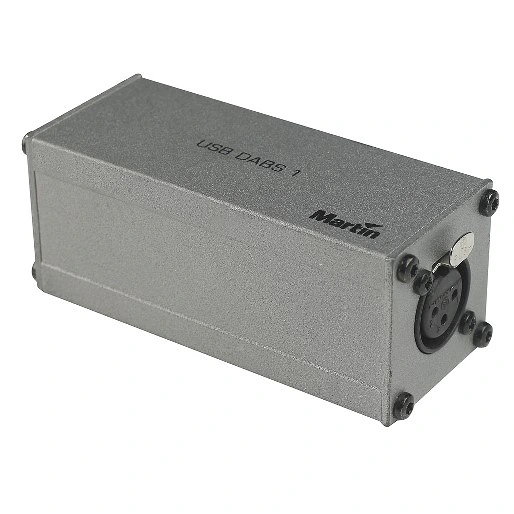
DABS1은 PC와 Martin 건축용 조명 제품군의 기기 간 통신을 위한 편리한 USB 인터페이스입니다. DABS1을 사용하려면 Martin 웹사이트에서 무료로 다운로드할 수 있는 Martin USB Tools 소프트웨어 및 드라이버 패키지가 필요합니다.
기능
- 컴퓨터에서 조명 기구 소프트웨어를 직접 업로드
- Windows 기반 PC 및 노트북 호환(Windows 7 및 8)
- 어디든 휴대 가능한 소형 경량 솔루션
- USB 전원 방식
- 3핀 XLR로 조명 기구에 직접 연결 또는 DMX 링크를 통한 연결 지원
상세 정보
물리적 사양
길이: 100 mm (4.0 in.)
너비: 40 mm (1.6 in.)
높이: 40 mm (1.6 in.)
무게: 0.3 kg (0.7 lbs.)
시스템 요구사항
USB 2.0 포트가 있는 Windows PC
Windows 7 또는 8
PC에 설치된 Martin USB Tools™ 드라이버 및 소프트웨어 패키지
1 GB RAM
Intel Core i3 또는 동급
사용 가능한 드라이브 공간 500 MB
모니터 해상도 1024x768
구조
하우징: 스틸
색상: 그레이
마감: 정전기 분체 도장
연결
Windows PC: USB 2.0
조명 기기로 데이터: 3핀 잠금식 XLR
포함 항목
DABS1™ USB-DMX 인터페이스 박스
DMX 터미네이션 플러그, 3핀 수 XLR: P/N 91613017
USB 케이블 (A/B), 1000 mm (39.4 in.): P/N 11840066
XLR 3핀 수 - RJ-45 어댑터: P/N 11840087
주문 정보
DABS1™ USB-DMX 인터페이스 박스: P/N 90758090
다운로드
Manuals
| 크기 | |
|
|
430KB |

Compliances
| 크기 | |
| 79.6KB |
 버전 B,
업데이트됨: 2018년 5월월
버전 B,
업데이트됨: 2018년 5월월
Software
| 크기 | |
|
|
107MB |

Service Notes
| 크기 | |
Compatibility Issues Software Uploader
 버전 A,
업데이트됨: 2018년 5월월
버전 A,
업데이트됨: 2018년 5월월
|
Hints and Tips
| 크기 | |
|
Compatibility issue with DABS1 interface and EXT 200 LED
버전 A,
업데이트됨: 2018년 5월월
|
Schematics
| 크기 | |
|
|
9.32KB |
위의 링크 중 하나에서 브라우저에 이상한 문자가 표시되면, 파일을 마우스 오른쪽 버튼으로 클릭하여 컴퓨터에 저장하십시오.


 컨설턴트 지원