Med en intuitiv touchscreen-optimeret brugergrænseflade er Maxedia det mest brugervenligt værktøj til mediakomposition og afspilning i alle typer af applikationer. Få adgang til et stort bibliotek af medieklip, stillbilleder og integrerede animationer uden behov for en kompleks lysfordelingscontroller. Maxedia Compact er en budgetbevidst løsning med lidt reducerede funktioner. Op til seks lag af SD-videomedia kan placeres i en cue. Den indeholder det samme indholdsomfang som Maxedia PRO for øjeblikkelige resultater. Pixelmapping er muligt med Maxedia Compact, og det er en ideel løsning til installationer, produktioner og lejefirmaer, da det er monteret i en lille 2U-rackboks.
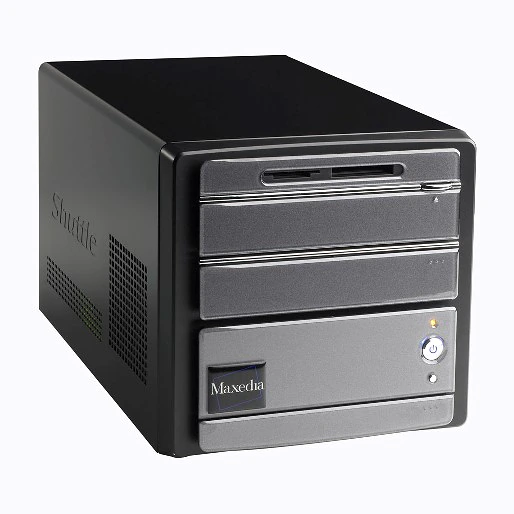
Større billeder
Funktioner
- Intuitive user interface
- DMX-in with universal USB/DMX interface
- 6 x 3D engine layer
- 1 top layer
- Effect plug-ins
- Pixelmapping / DMX out
- Video speed control
- Two video output configurations (Out 1 + GUI or Out 1 + Out 2)
Flere detaljer
Physical Length: 325 mm Width: 240 mm Height: 195 mm
Control/User Interface Real-world paradigm intuitive interface (images, dynamic text labels and actuals preferred to figures): Maxxyz/Maxedia family user interface: 16 x customizable screen workspace/configurations: Touchscreen-compatible user interface: Keymapping (cues and transitions assignable to keyboard keys for instant triggering): Fixture patches identical with Maxxyz series, can be imported from Maxxyz: DMX Viewer for DMX IN value reports: 6 x 3D engine layers: Static and dynamic effect presets (e.g. blending, moves): Range of 2D and 3D plug-ins, various media: Shader and shader media: Video cue recording, no limits: Transitions and wipes: Output parameter adjustments, keystoning and framing: Masking:
Playback Video output resolution: 800x600, 1024x786 Two video output configurations (out 1 + GUI or out 1 + out 2): Number of media layers: 6 each in A/B mixers Number of 'top layers' (always on top): 1 Network synchronization content: Yes Network synchronization playback: Yes Pixel mapping (image pixel to fixture): CMY and RGB Integrated test pattern generator: Master/client networking with cue/media/timecode synchronization: Media files in SD resolution (DV codec):
Hardware Standard Shuttle PC without keyboard, mouse, screens or flightcase: Shuttle XPC P3100G: Pentium D, 3.2 GHz: 2 GB 200 SA memory: 2 x SATA WDC 200 GB hard disk drives: ATI PC I Express X1600 video card: DVD +/- R/RW drive: USB Sentinel Software Protection Key:
Software Embedded OS, Win XPe user interface: Supported media: AVI and MOV with DV codec in SD quality, WMV, JPEG, BMP, Flash Pixel mapping software for direct DMX out fixture control: Worldwide fixture library: Media Manager for media import and export: MAXNET network system for networking multiple media server and Maxxyz control systems:
Connections DMX data in/out: Processed by Universal USB/DMX Interface hardware (available separately) Storage media/hardware/network/video: 2 x USB, 1 x IEEE 1394 Firewire Ethernet Remote: RJ-45 Camera input: IEEE 1394 Firewire User display interface (VGA, 1024x768): DVI
Electrical AC power: 100-240 V nominal, 50/60 Hz
Approvals UL approved: EU safety: EN 60950 EU EMC: EN 55022, EN 55024, EN 61000-3-2, EN 61000-3-3
Included Items Maxedia Quick Start Guide: Standard Media Library (images and videos) on 5 DVDs: Maxedia OS DVD:
Ordering Information Maxedia Compact, EU, US: 90732540
Downloads
Service Procedures
| Størrelse | |
|
|
1,44 MB |

Service Notes
| Størrelse | |
|
|
828 kB |
|
|
1,7 MB |
Burning ISO files for Martin Controllers
 version B,
opdateret: maj 2018
version B,
opdateret: maj 2018
|
|
|
Maxedia File Saving Procedures
version A,
opdateret: maj 2018
|
Hints and Tips
| Størrelse | |
|
Adding External Touchscreens
version A,
opdateret: maj 2018
|
Hvis nogle af linksene ovenfor resulterer i mærkelige tegn i din browser, skal du højreklikke på filen for at gemme den på din computer.


 Konsulentsupport