The Detonator is an optional, dedicated remote control tool for easy command of the Atomic 3000 DMX strobe's flash rate and intensity. It includes “blinder effect” and “single flash” detonator buttons as well as a chase/synchronization toggle switch. Easy to set up and operate, the Atomic Detonator requires no external power source.
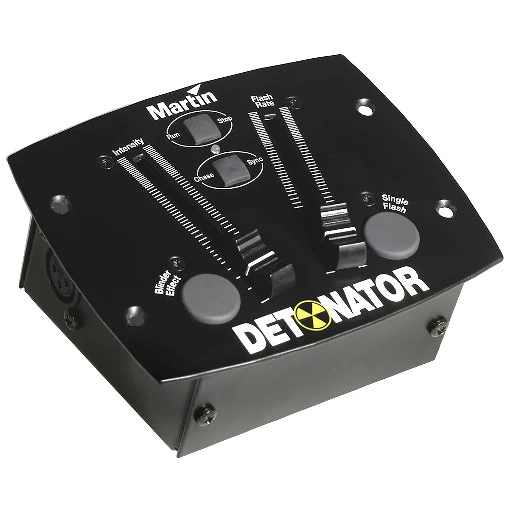
Większe obrazy
Funkcje
- Dedicated remote control for Atomic 3000 DMX strobe
- Fader-controlled flash rate and intensity
- Single button for Detonator blinder effect
- Separate button for single flash and flash sync
- Chase effect operation with multiple units
- No external power necessary
- Easy set-up and operation
Więcej szczegółów
Physical
Length: 142 mm (5.6 in.)
Width: 113 mm (4.5 in.)
Height: 75 mm (3.0 in.)
Weight: 0.7 kg (1.6 lbs.)
Playback
Run/stop toggle
Strobe rate: 0 - 25 Hz (50 Hz mains), 0 - 30 Hz (60 Hz mains)
Intensity: 0 - 100%
Chase/sync toggle for use with multiple fixtures
Single flash
Flash synchronization
Blinder effect: Triggering with variable intensity
System integration
Compatible with original Atomic 3000 DMX (not Atomic 3000 LED)
Construction
Housing: Steel
Color(s): Black
Connections
DC power input: 3 volt drawn from master fixture via control cable
Control signal output: 3-pin locking XLR
Approvals
EU safety: EN 60950
EU EMC: EN 55103-1, EN 55103-2

Included Items
5 m data cable, 3-pin XLR: P/N 11820008
Ordering Information
Detonator, Atomic Remote Control: P/N 90760020
Pobrania
Manuals
| Rozmiar | |
|
|
1,04 MB |
|
|
1,03 MB |

 wersja B,
zaktualizowano: paź 2020
wersja B,
zaktualizowano: paź 2020
Compliances
| Rozmiar | |
| 711 KB |
 wersja A,
zaktualizowano: paź 2020
wersja A,
zaktualizowano: paź 2020
Hints and Tips
| Rozmiar | |
Electrical safety test equipment
 wersja B,
zaktualizowano: maj 2018
wersja B,
zaktualizowano: maj 2018
|
Jeśli któryś z powyższych linków wyświetla dziwne znaki w przeglądarce, kliknij plik prawym przyciskiem myszy, aby zapisać go na komputerze.


 Wsparcie dla Konsultantów