Größere Bilder
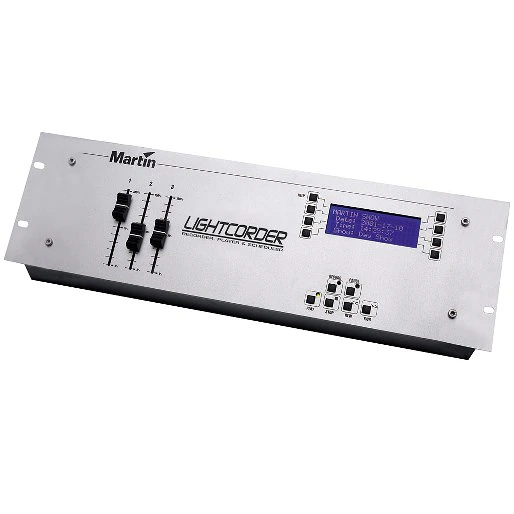
Der LightCorder ist ein benutzerfreundliches Lightshow-Aufnahmegerät, das es Ihnen ermöglicht, beliebige DMX-512-Ausgaben in Echtzeit aufzuzeichnen und wiederzugeben.
Eigenschaften
- 6 Minuten bis 3 Stunden Aufnahmezeit
- 8 MB herausnehmbare Speicherkarte im Lieferumfang enthalten, bis 64 MB verfügbar
- Zuweisbare Fader ermöglichen sofortigen Zugriff auf jeden Beleuchtungsparameter
- Integrierter DMX-Viewer/Tester
- Integrierter Windows Scheduler für einfache Einrichtung von Lichtshows
- DMX 512 in Echtzeit aufzeichnen und wiedergeben
- Fernsteuerbar über RS-232
- Benutzerfreundliche Oberfläche – leicht ablesbares LCD-Display
Mehr Details
Physikalisch
Länge: 483 mm
Breite: 133 mm
Höhe: 69 mm
Gewicht: 1,7 kg
Steuerung und Programmierung
Echtzeit-Aufzeichnung von 64, 128, 256 oder 512 DMX-Kanälen:
Vier Abtastfrequenzen: 10 Hz, 20 Hz, 30 Hz und 40 Hz
Aufzeichnung von Shows mit einer Dauer von bis zu 28 Stunden (auf einer 64-MB-Flash-Memory-Karte bei 10 Hz):
Aufzeichnung von bis zu 32 einzelnen Shows pro Flash-Memory-Karte:
Überwachung der DMX-Werte auf 512 Kanälen in Echtzeit:
24-Stunden-Echtzeituhr und Kalender zur Planung von Shows:
Kompatibel mit Flash-Memory-Karten von Martin, Samsung oder Toshiba:
Programmierkapazität
4-MB-Flash-Memory-Karte (ca.): 3 Minuten (512 Kanäle @ 40 Hz) bis 1 Stunde 46 Minuten (64 Kanäle @ 10 Hz)
8-MB-Flash-Memory-Karte (ca.): 6 Minuten (512 Kanäle @ 40 Hz) bis 3 Stunden 33 Minuten (64 Kanäle @ 10 Hz)
16-MB-Flash-Memory-Karte (ca.): 13 Minuten (512 Kanäle @ 40 Hz) bis 7 Stunden (64 Kanäle @ 10 Hz)
32-MB-Flash-Memory-Karte (ca.): 26 Minuten (512 Kanäle @ 40 Hz) bis 14 Stunden (64 Kanäle @ 10 Hz)
64-MB-Flash-Memory-Karte (ca.): 53 Minuten (512 Kanäle @ 40 Hz) bis 28 Stunden (64 Kanäle @ 10 Hz)
Wiedergabe
Drag-and-Drop-Planung der Show-Wiedergabe mit der PC-basierten Anwendung LightCorder Scheduler:
Der Wiedergabemodus ermöglicht die einfache Auswahl und Wiedergabe voraufgezeichneter Shows:
Planung einzelner, mehrfacher oder in Schleife wiedergegebener Shows:
Unabhängiger Hintergrund-Cue mit 5 parallelen Sequenzen:
Der RS-232-Befehlsmodus ermöglicht die Steuerung des LightCorder über ein PC-basiertes Lichtsteuerungssystem wie das Martin ProScenium:
Hardware
LCD-Display mit 20 x 4 Zeichen:
Aluminiumgehäuse mit Gummipuffern:
DMX-Ein-/Ausgänge, 3-poliges XLR:
Steckplatz für Martin/Samsung/Toshiba-Flash-Memory-Karten:
Montagelöcher für 19"-Rack:
Elektrisch
Netzspannung: Automatische Bereichsanpassung 100–240 VAC nominal, 50/60 Hz
Netzeingang: 3-poliger IEC-Stecker
Maximale Leistung und Stromaufnahme: 30 mA, 1,5 W @ 110 V, 20 mA, 1,6 W @ 230 V
Lieferumfang
Martin LightCorder Scheduler Software-CD:
64-MB-Flash-Memory-Karte:
9-poliges RS-232-Kabel:
XLR-Kabel, 5-poliger Stecker auf 3-polige Buchse:
XLR-Kabel, 5-polige Buchse auf 3-poligen Stecker:
1,5 m Netzkabel, 3-polig IEC:
Benutzerhandbuch:
Zubehör
8-MB-Flash-Memory-Karte: 02039003
Bestellinformationen
LightCorder: 90726000
Downloads
Specifications
| Größe | |
 Exterior 600 Compact, MX 10 Extreme, Wizard Extreme, LightCorder, M¥Flex 12, M¥Flex 15, M¥Flex S- Technische Daten
 Version E,
aktualisiert: Mai 2018
Version E,
aktualisiert: Mai 2018
|
10,5 KB |
|
|
54,8 KB |
|
|
7,31 KB |
| 36,8 KB | |
|
|
10,9 KB |
|
|
7,96 KB |
 Version C,
aktualisiert: Okt 2020
Version C,
aktualisiert: Okt 2020
 Version E,
aktualisiert: Okt 2020
Version E,
aktualisiert: Okt 2020
 Version E,
aktualisiert: Okt 2020
Version E,
aktualisiert: Okt 2020
Manuals
| Größe | |
|
|
600 KB |
|
|
643 KB |
|
|
817 KB |
|
|
813 KB |
Illustrations
| Größe | |
|
|
261 KB |
|
|
353 KB |

Compliances
| Größe | |
| 711 KB |
Falls einer der obigen Links zu seltsamen Zeichen in Ihrem Browser führt, klicken Sie bitte mit der rechten Maustaste auf die Datei, um sie auf Ihrem Computer zu speichern.


 Beratersupport