صور أكبر
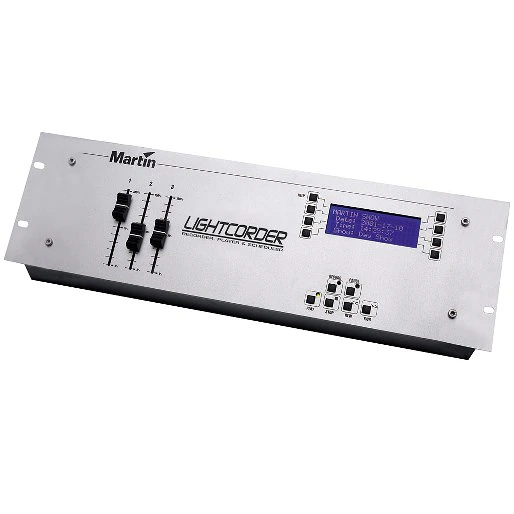
The LightCorder is an easy to operate lightshow recorder that allows you to record and playback any DMX-512 output in real time.
الميزات
- 6 minutes to 3 hours of recording time
- 8 Mb removable memory card included up to 64 Mb available
- Assignable faders allow for instant access to any lighting parameter
- Built-in DMX viewer/tester
- Built-in Windows Scheduler for easy set-up of light shows
- Record and playback DMX 512 in real time
- Remote controllable via RS-232
- Simple user interface – easy-to-read LCD display
مزيد من التفاصيل
Physical
Length: 483 mm
Width: 133 mm
Height: 69 mm
Weight: 1.7 kg
Control and Programming
Record 64, 128, 256, or 512 DMX channels in real time:
Four sampling frequencies: 10 Hz, 20 Hz, 30 Hz, and 40 Hz
Record shows of up to 28 hours duration (on a 64 MB flash memory card at 10 Hz):
Record up to 32 individual shows per flash memory card:
Monitor DMX values on 512 channels in real time:
24-hour real time clock and calendar for scheduling of shows:
Compatible with Martin, Samsung, or Toshiba flash memory cards:
Programming Capacity
4 MB flash memory card (approx.): 3 minutes (512 channels @ 40 Hz) to 1 hour 46 minutes (64 channels @ 10 Hz)
8 MB flash memory card (approx.): 6 minutes (512 channels @ 40 Hz) to 3 hours 33 minutes (64 channels @ 10 Hz)
16 MB flash memory card (approx.): 13 minutes (512 channels @ 40 Hz) to 7 hours (64 channels @ 10 Hz)
32 MB flash memory card (approx.): 26 minutes (512 channels @ 40 Hz) to 14 hours (64 channels @ 10 Hz)
64 MB flash memory card (approx.): 53 minutes (512 channels @ 40 Hz) to 28 hours (64 channels @ 10 Hz)
Playback
Drag-and-drop scheduling of show playback using the PC-based LightCorder Scheduler application:
Playback mode provides easy user selection and playback of pre-recorded shows:
Schedule single, multiple, or looped playback of shows:
Independent background cue with 5 parallel sequences:
RS-232 command mode enables control of the LightCorder via a PC-based lighting control system such as the Martin ProScenium:
Hardware
20 x 4 character LCD display:
Aluminum housing with rubber fenders:
DMX 3-pin XLR in/out connections:
Slot for Martin/Samsung/Toshiba flash memory card:
Mounting holes for 19” rack:
Electrical
AC power: Auto-ranging 100 - 240 VAC nominal, 50/60 Hz
AC input: 3-pin IEC male socket
Maximum power and current: 30 mA, 1.5 W @ 110 V, 20 mA, 1.6 W @ 230 V
Included Items
Martin LightCorder Scheduler software CD:
64 MB flash memory card:
9-pin RS-232 cable:
5-pin male to 3-pin female XLR cable:
5-pin female to 3-pin male XLR cable:
1.5 m power cable, 3-pin IEC:
User manual:
Accessories
8 MB flash memory card: 02039003
Ordering Information
LightCorder: 90726000
التنزيلات
Specifications
| الحجم | |
 Exterior 600 Compact, MX 10 Extreme, Wizard Extreme, LightCorder, M¥Flex 12, M¥Flex 15, M¥Flex S- Technische Daten
 الإصدار E,
تم التحديث: مايو 2018
الإصدار E,
تم التحديث: مايو 2018
|
10.5 KB |
|
|
54.8 KB |
|
|
7.31 KB |
| 36.8 KB | |
|
|
10.9 KB |
|
|
7.96 KB |
 الإصدار C,
تم التحديث: أكتوبر 2020
الإصدار C,
تم التحديث: أكتوبر 2020
 الإصدار E,
تم التحديث: أكتوبر 2020
الإصدار E,
تم التحديث: أكتوبر 2020
 الإصدار E,
تم التحديث: أكتوبر 2020
الإصدار E,
تم التحديث: أكتوبر 2020
Manuals
| الحجم | |
|
|
600 KB |
|
|
643 KB |
|
|
817 KB |
|
|
813 KB |
Illustrations
| الحجم | |
|
|
261 KB |
|
|
353 KB |

Compliances
| الحجم | |
| 711 KB |
إذا أدت أي من الروابط أعلاه إلى أحرف غريبة في متصفحك، يرجى النقر بزر الماوس الأيمن على الملف لحفظه على جهاز الكمبيوتر الخاص بك.


 دعم الاستشاريين