Mit einer intuitiven, für Touchscreen optimierten Benutzeroberfläche ist Maxedia™ das benutzerfreundlichste Tool für Medienzusammenstellung und Wiedergabe in allen Anwendungstypen. Greifen Sie auf eine umfangreiche Bibliothek mit Medienclips, Standbildern und integrierten Animationen zu – ganz ohne komplexe Beleuchtungssteuerung.
Basierend auf einem Dual-Core-Verarbeitungssystem ist Maxedia PRO™ ein leistungsstarkes System mit Unterstützung für die Wiedergabe von High-Definition-Inhalten mit bis zu zwei 1080p-Streams. Zwei Ausgänge stehen zur Verfügung, die jeweils als Benutzeroberfläche oder Wiedergabe-Engine konfiguriert werden können. Die Engine-Ausgabe kann auf drei Projektoren verteilt werden, um nahtlose Breitbilddarstellungen zu erzeugen. Maxedia PRO™ unterstützt eine vollständige Pixel-Mapping-Engine für CMY- und RGB-Systeme.
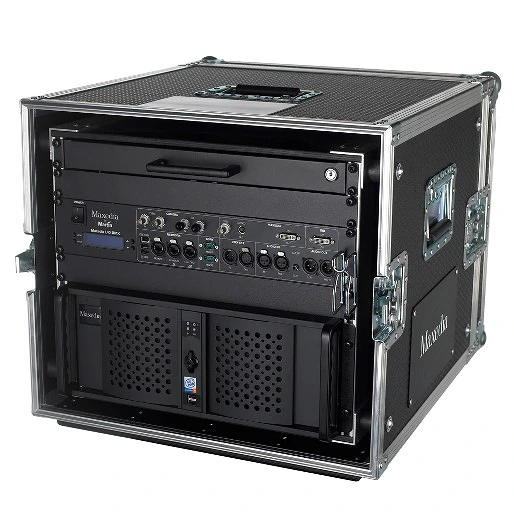
Größere Bilder
Eigenschaften
- Intuitive Benutzeroberfläche
- 20 x 3D-Engine-Layer
- Pixelmapping / DMX-Ausgang (ArtNet und DMX 512)
- 1 Top-Layer
- Effekt-Plug-ins
- DMX-Eingang via Ethernet (ArtNet) oder IO-Box oder Universal USB2DMX
- Videogeschwindigkeitsregelung
- Zwei Videoausgangskonfigurationen (Ausgang 1 + GUI oder Ausgang 1 + Ausgang 2)
Mehr Details
Physische Daten Flightcase-Version: Länge: 890 mm Breite: 580 mm Höhe: 530 mm Gewicht: 74,5 kg Abmessungen und Gewicht beziehen sich auf das komplette System einschließlich Flightcase: Rackmount-Version: Länge: 530 mm Breite: 480 mm Höhe: 180 mm Gewicht: 25,4 kg
Steuerung/Benutzeroberfläche Benutzeroberfläche der Maxxyz/Maxedia-Familie: 16 x anpassbare Bildschirm-Arbeitsbereiche/-Konfigurationen: Touchscreen-kompatible Benutzeroberfläche: Keymapping (Cues und Übergänge können Tastaturtasten zum sofortigen Auslösen zugewiesen werden): Fixture-Patches identisch mit der Maxxyz-Serie, Import von/Export nach Maxxyz möglich: DMX Viewer zur Anzeige der DMX-IN-Werte: 20 x 3D-Engine-Layer (19 Benutzer-Layer + 1 Standard-Layer): Statische und dynamische Effekt-Presets (z. B. Blending, Bewegungen, Effekte): Auswahl an 2D- und 3D-Plug-ins, verschiedene Medien: Shader und Shader-Medien: Video-Cue-Aufzeichnung mit 256 Seiten à 256 Cues pro Show: Übergänge und Wipes: Anpassung der Ausgangsparameter, Keystone-Korrektur und Framing: Masking: Benutzerfreundliches Multi-Screen-Blending-Tool: Intuitives Pixel-Mapping-Tool:
Wiedergabe Video-Wiedergabeauflösung: 480i, 480p, 576i, 576p, 720p, 1080i, 1080p Video-Ausgangsauflösung: Von 1024 x 768 bis 3840 x 1024* Video-Ausgangskonfigurationen: Zwei (Out 1 + GIU oder Out 1 + Out 2) Anzahl der Medien-Layer: Je 20 in A/B-Mixern (19 benutzerdefinierte und 1 Standard-Layer) Anzahl der „Top Layer“ (Overlay): Vier pro Engine Netzwerksynchronisierung von Inhalten: Ja Pixel-Mapping (Bildpixel auf Fixture): CMY und RGB Testbildgenerator: Integriert Master/Client-Vernetzung mit Cue-/Medien-/Timecode-Synchronisierung: Mediendateien in SD- und HD-Auflösung (Engine optimiert für H.264/MPEG-4 AVC Codec, WMV-Format unterstützt):
Hardware Motherboard: High-End Intel Prozessor: Multi-Core Intel RAM: 4 GB High-Speed Betriebssystem-Festplatte: 1 x mit hoher Kapazität Medien-Festplatten: 1 x mit hoher Kapazität Grafikkarte: ATI Radeon Capture-Karte: 1 x Composite/S-Video Netzwerkkarte: 1 x Intel Dual Gbit LAN Ethernet-Karte
Software Embedded OS, Win XPe Benutzeroberfläche: Unterstützte Medien: MPEG-4, H.264, AVI mit DV-Codec in SD-Qualität, WMV, JPEG, BMP Engine optimiert für H.264/MPEG-4 AVC, MOV und AVI HD: Pixel-Mapping-Software zur direkten Fixture-Steuerung über DMX-Ausgang: Weltweite Fixture-Bibliothek: Media Manager für Medienimport und -export: MAXNET-Netzwerksystem zur Vernetzung mehrerer Medienserver- und Maxxyz-Steuersysteme: Matrox DualHead2Go- und TripleHead2Go-fähig (eines pro Maxedia Pro System): Vorbereitet für HD-Capture-Karte. HD-SDI oder HD-DVI 1080p, ein oder zwei Eingänge, maximale Latenz 1–2 Frames (optional):
Anschlüsse Flightcase-Version mit I/O-Box im Lieferumfang: Computer-I/O: 8 x USB, 1 x IEEE 1394 Firewire, 2 x eSATA DMX-Eingang: 5-poliges XLR mit Verriegelung Remote-Netzwerk, ArtNet-Eingang, ArtNet-Ausgang: 3 x RJ45 Benutzer-Displayschnittstelle (VGA, mindestens 1024x768): DVI/VGA Digitalaudio: Optischer Digitalausgang Analoger Audioeingang: 3,5-mm-Stereo-Miniklinke, XLR Analoger Audioausgang: 3,5-mm-Stereo-Miniklinke, XLR Maus: USB Tastatur: USB Rackmount-Version: Computer-I/O: 8 x USB, 1 x IEEE 1394 Firewire, 2 x eSATA DMX-Eingang: Über ArtNet oder optionales Martin Universal USB/DMX Interface Remote-Netzwerk, ArtNet-Eingang, ArtNet-Ausgang: 3 x RJ45 Benutzer-Displayschnittstelle (VGA, mindestens 1024x768): DVI/VGA Playback-Ausgang: DVI/VGA Digitalaudio: Optischer Digitalausgang Analoger Audioeingang: 3,5-mm-Stereo-Miniklinke Analoger Audioausgang: 3,5-mm-Stereo-Miniklinke Maus: USB Tastatur: USB
Elektrik Netzspannung: 100–240 V nominal, 50/60 Hz
Typische Leistung und Stromaufnahme 120 V, 60 Hz: 318 W, 2,7 A, PF 0,968 230 V, 50 Hz: 335 W, 1,5 A, PF 0,946
Zulassungen UL-Zulassung: EU-Sicherheit: EN 60950 EU-EMV: EN 55022, EN 55024, EN 61000-3-2, EN 61000-3-3
Lieferumfang Im Lieferumfang der Flightcase-Version:: Maxedia Media Server: Maxedia I/O Module Breakout Box: Maxedia Kurzanleitung: Standard-Medienbibliothek (Bilder und Videos) auf 5 DVDs: Maxedia OS DVD: Maxedia Rack-Flightcase: Ausziehbare QWERTY-Tastatur mit Trackpad in abschließbarer Schublade: Maxedia Schlüssel für Schlösser: 1,5 m Netzkabel, 3-polig IEC: Im Lieferumfang der Rackmount-Version:: Maxedia Media Server: Maxedia Kurzanleitung: Standard-Medienbibliothek (Bilder und Videos) auf 5 DVDs: Maxedia OS DVD: Maxedia Schlüssel für Schlösser: 1,5 m Netzkabel, 3-polig IEC:
Zubehör MCC (Maxedia Capture Card) Dual-HD-SDI-Eingangskarte für Maxedia: 90732640 MCC (Maxedia Capture Card) Dual-DVI/VGA-Eingangskarte für Maxedia: 90732630 Maxedia PCI-Dual-LAN-Karte: 90732650
Bestellinformationen Maxedia Pro System mit Flightcase, I/O-Box und Tastaturschublade: 90732520 Maxedia Pro System RM (nur Rackmount): 90732580 Maxedia I/O Breakout Box 19": 90732610 Centronic-Kabel für Maxedia I/O Breakout Box: 91613040 Maxedia Flightcase: 91535060 Maxedia Tastaturschublade mit Tastatur: 91613050
Downloads
Specifications
| Größe | |
|
|
5,67 MB |

Manuals
| Größe | |
|
|
3,7 MB |
|
|
5,53 MB |

 Version B,
aktualisiert: Mai 2018
Version B,
aktualisiert: Mai 2018
Service Procedures
| Größe | |
|
|
105 KB |
Service Notes
| Größe | |
Burning ISO files for Martin Controllers
 Version B,
aktualisiert: Mai 2018
Version B,
aktualisiert: Mai 2018
|
|
|
|
2,03 MB |
|
|
828 KB |
|
Maxedia File Saving Procedures
Version A,
aktualisiert: Mai 2018
|
Hints and Tips
| Größe | |
|
Adding External Touchscreens
Version A,
aktualisiert: Mai 2018
|
Falls einer der obigen Links zu seltsamen Zeichen in Ihrem Browser führt, klicken Sie bitte mit der rechten Maustaste auf die Datei, um sie auf Ihrem Computer zu speichern.


 Beratersupport