Utilizing an intuitive touchscreen-optimized user interface, Maxedia™ is the most user-friendly tool for media composing and playback in all types of applications. Access a vast library of media clips, still images and integrated animations without the need for a complex lighting controller.
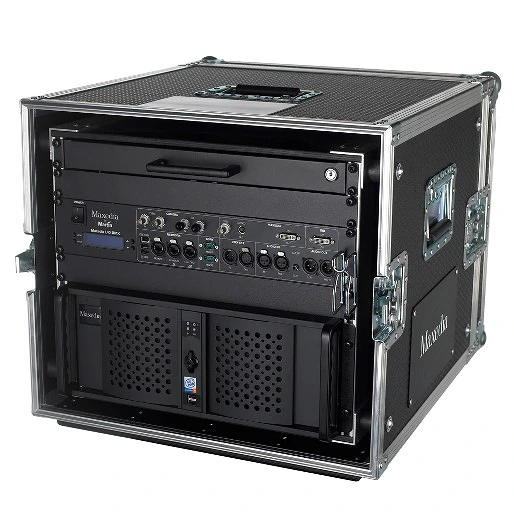
Based on a dual-core processing system, Maxedia PRO™ is a solid performer with support for High Definition content playback up to two 1080p. Two outputs are available and each can be configured as a user interface or playback engine. The engine output can be split over three projectors for seamless widescreen images. Maxedia PRO™ supports a full pixel mapping engine for CMY and RGB systems.
Större bilder
Funktioner
- Intuitive user interface
- 20 x 3D engine layers
- Pixelmapping / DMX out (ArtNet and DMX 512)
- 1 top layer
- Effect plug-ins
- DMX-in via Ethernet (ArtNet) or IO-Box or Universal USB2DMX
- Video speed control
- Two video output configurations (Out 1 + GUI or Out 1 + Out 2)
Fler detaljer
Physical Flightcase version: Length: 890 mm Width: 580 mm Height: 530 mm Weight: 74.5 kg Dimensions and weight are for complete system including flightcase: Rackmount version: Length: 530 mm Width: 480 mm Height: 180 mm Weight: 25.4 kg
Control/User Interface Maxxyz/Maxedia family user interface: 16 x customizable screen workspace/configurations: Touchscreen-compatible user interface: Keymapping (cues and transitions assignable to keyboard keys for instant triggering): Fixture patches identical with Maxxyz series, can be imported from/exported to Maxxyz: DMX Viewer for DMX IN value reports: 20 x 3D engine layers (19 user layers + 1 default layer): Static and dynamic effect presets (e.g. blending, moves, effects): Range of 2D and 3D plug-ins, various media: Shader and shader media: Video cue recording with 256 pages of 256 cues per show: Transitions and wipes: Output parameter adjustments, keystoning and framing: Masking: User-friendly multi-screen blending tool: Intuitive pixel mapping tool:
Playback Video playback resolution: 480i, 480p, 576i, 576p, 720p, 1080i, 1080p Video output resolution: From 1024 x 768 to 3840 x 1024* Video output configurations: Two (out 1 + GIU or out 1 + out 2) Number of media layers: 20 each in A/B mixers (19 custom and 1 default layer) Number of 'top layers' (overlay): Four per engine Network synchronization content: Yes Pixel mapping (image pixel to fixture): CMY and RGB Test pattern generator: Integrated Master/client networking with cue/media/timecode synchronization: Media files in SD and HD resolution (engine optimized for H.264/MPEG-4 AVC codec, WMV format supported):
Hardware Motherboard: High-end Intel Processor: Multi-core Intel RAM: 4 GB high-speed OS hard drive: 1 x high-capacity Media hard drives: 1 x high-capacity Graphics card: ATI Radeon Capture card: 1 x Composite/S-Video Network card: 1 x Intel Dual Gbit LAN Ethernet card
Software Embedded OS, Win XPe user interface: Supported media: MPEG-4, H.264, AVI with DV codec in SD quality, WMV, JPEG, BMP Engine optimized for H.264/MPEG-4 AVC, MOV and AVI HD: Pixel mapping software for direct DMX out fixture control: Worldwide fixture library: Media Manager for media import and export: MAXNET network system for networking multiple media server and Maxxyz control systems: Matrox DualHead2Go- and TripleHead2Go-ready (one per Maxedia Pro system): HD capture card-ready. HD-SDI or HD-DVI 1080p, single or dual inputs, 1-2 frames maximum latency (optional):
Connections Flightcase version with I/O box included: Computer I/O: 8 x USB, 1 x IEEE 1394 Firewire, 2 x eSATA DMX in: 5-pin locking XLR Remote network, ArtNet in, ArtNet out: 3 x RJ45 User display interface (VGA, 1024x768 minimum): DVI/VGA Digital audio: Optical digital out Analog audio in: 3.5 mm stereo mini-jack, XLR Analog audio out: 3.5mm stereo mini-jack, XLR Mouse: USB Keyboard: USB Rackmount version: Computer I/O: 8 x USB, 1 x IEEE 1394 Firewire, 2 x eSATA DMX in: Via ArtNet or optional Martin Universal USB/DMX Interface device Remote network, ArtNet in, ArtNet out: 3 x RJ45 User display interface (VGA, 1024x768 minimum): DVI/VGA Playback output: DVI/VGA Digital audio: Optical digital out Analog audio in: 3.5mm stereo mini-jack Analog audio out: 3.5mm stereo mini-jack Mouse: USB Keyboard: USB
Electrical AC power: 100-240 V nominal, 50/60 Hz
Typical Power and Current 120 V, 60 Hz: 318 W, 2.7 A, PF 0.968 230 V, 50 Hz: 335 W, 1.5 A, PF 0.946
Approvals UL approved: EU safety: EN 60950 EU EMC: EN 55022, EN 55024, EN 61000-3-2, EN 61000-3-3
Included Items Included with flightcase version:: Maxedia Media Server: Maxedia I/O Module Breakout Box: Maxedia Quick Start Guide: Standard Media Library (images and videos) on 5 DVDs: Maxedia OS DVD: Maxedia rack flightcase: Slide-out QWERTY keyboard with trackpad in lockable drawer: Maxedia lock keys: 1.5 m power cable, 3-pin IEC: Included with rackmount version:: Maxedia Media Server: Maxedia Quick Start Guide: Standard Media Library (images and videos) on 5 DVDs: Maxedia OS DVD: Maxedia lock keys: 1.5 m power cable, 3-pin IEC:
Accessories MCC (Maxedia Capture Card) Dual HD-SDI input card for Maxedia: 90732640 MCC (Maxedia Capture Card) Dual DVI/VGA input card for Maxedia: 90732630 Maxedia PCI Dual LAN card: 90732650
Ordering Information Maxedia Pro System with flightcase, I/O box and keyboard tray: 90732520 Maxedia Pro System RM (rackmount only): 90732580 Maxedia I/O Breakout Box 19": 90732610 Centronic cable for Maxedia I/O Breakout Box: 91613040 Maxedia Flightcase: 91535060 Maxedia Keyboard Drawer with Keyboard: 91613050
Nedladdningar
Specifications
| Storlek | |
|
|
5,67 MB |

Manuals
| Storlek | |
|
|
3,7 MB |
|
|
5,53 MB |

 version B,
uppdaterad: maj 2018
version B,
uppdaterad: maj 2018
Service Procedures
| Storlek | |
|
|
105 KB |
Service Notes
| Storlek | |
Burning ISO files for Martin Controllers
 version B,
uppdaterad: maj 2018
version B,
uppdaterad: maj 2018
|
|
|
|
2,03 MB |
|
|
828 KB |
|
Maxedia File Saving Procedures
version A,
uppdaterad: maj 2018
|
Hints and Tips
| Storlek | |
|
Adding External Touchscreens
version A,
uppdaterad: maj 2018
|
Om någon av länkarna ovan resulterar i konstiga tecken i din webbläsare, högerklicka på filen för att spara den på din dator.


 Konsultsupport