Grâce à une interface utilisateur intuitive optimisée pour écran tactile, Maxedia™ est l'outil le plus convivial pour la composition et la lecture de médias dans tous les types d'applications. Accédez à une vaste bibliothèque de clips vidéo, d'images fixes et d'animations intégrées sans avoir recours à un contrôleur d'éclairage complexe.
Reposant sur un système de traitement à double cœur, Maxedia PRO™ offre des performances remarquables et prend en charge la lecture de contenus en haute définition jusqu'à deux flux 1080p. Deux sorties sont disponibles et chacune peut être configurée comme interface utilisateur ou comme moteur de lecture. La sortie du moteur peut être répartie sur trois projecteurs afin d'obtenir des images grand écran sans raccord visible. Maxedia PRO™ intègre un moteur complet de mappage de pixels pour les systèmes CMY et RGB.
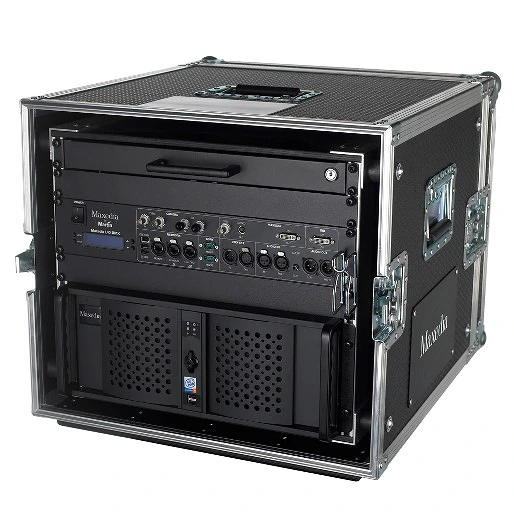
Grandes images
Caractéristiques
- Interface utilisateur intuitive
- 20 couches moteur 3D
- Pixelmapping / DMX out (ArtNet et DMX 512)
- 1 couche supérieure
- Plug-ins d'effets
- DMX-in via Ethernet (ArtNet) ou IO-Box ou Universal USB2DMX
- Contrôle de la vitesse vidéo
- Deux configurations de sortie vidéo (Out 1 + GUI ou Out 1 + Out 2)
plus de détails
Physical Flightcase version: Length: 890 mm Width: 580 mm Height: 530 mm Weight: 74.5 kg Dimensions and weight are for complete system including flightcase: Rackmount version: Length: 530 mm Width: 480 mm Height: 180 mm Weight: 25.4 kg
Control/User Interface Maxxyz/Maxedia family user interface: 16 x customizable screen workspace/configurations: Touchscreen-compatible user interface: Keymapping (cues and transitions assignable to keyboard keys for instant triggering): Fixture patches identical with Maxxyz series, can be imported from/exported to Maxxyz: DMX Viewer for DMX IN value reports: 20 x 3D engine layers (19 user layers + 1 default layer): Static and dynamic effect presets (e.g. blending, moves, effects): Range of 2D and 3D plug-ins, various media: Shader and shader media: Video cue recording with 256 pages of 256 cues per show: Transitions and wipes: Output parameter adjustments, keystoning and framing: Masking: User-friendly multi-screen blending tool: Intuitive pixel mapping tool:
Playback Video playback resolution: 480i, 480p, 576i, 576p, 720p, 1080i, 1080p Video output resolution: From 1024 x 768 to 3840 x 1024* Video output configurations: Two (out 1 + GIU or out 1 + out 2) Number of media layers: 20 each in A/B mixers (19 custom and 1 default layer) Number of 'top layers' (overlay): Four per engine Network synchronization content: Yes Pixel mapping (image pixel to fixture): CMY and RGB Test pattern generator: Integrated Master/client networking with cue/media/timecode synchronization: Media files in SD and HD resolution (engine optimized for H.264/MPEG-4 AVC codec, WMV format supported):
Hardware Motherboard: High-end Intel Processor: Multi-core Intel RAM: 4 GB high-speed OS hard drive: 1 x high-capacity Media hard drives: 1 x high-capacity Graphics card: ATI Radeon Capture card: 1 x Composite/S-Video Network card: 1 x Intel Dual Gbit LAN Ethernet card
Software Embedded OS, Win XPe user interface: Supported media: MPEG-4, H.264, AVI with DV codec in SD quality, WMV, JPEG, BMP Engine optimized for H.264/MPEG-4 AVC, MOV and AVI HD: Pixel mapping software for direct DMX out fixture control: Worldwide fixture library: Media Manager for media import and export: MAXNET network system for networking multiple media server and Maxxyz control systems: Matrox DualHead2Go- and TripleHead2Go-ready (one per Maxedia Pro system): HD capture card-ready. HD-SDI or HD-DVI 1080p, single or dual inputs, 1-2 frames maximum latency (optional):
Connections Flightcase version with I/O box included: Computer I/O: 8 x USB, 1 x IEEE 1394 Firewire, 2 x eSATA DMX in: 5-pin locking XLR Remote network, ArtNet in, ArtNet out: 3 x RJ45 User display interface (VGA, 1024x768 minimum): DVI/VGA Digital audio: Optical digital out Analog audio in: 3.5 mm stereo mini-jack, XLR Analog audio out: 3.5mm stereo mini-jack, XLR Mouse: USB Keyboard: USB Rackmount version: Computer I/O: 8 x USB, 1 x IEEE 1394 Firewire, 2 x eSATA DMX in: Via ArtNet or optional Martin Universal USB/DMX Interface device Remote network, ArtNet in, ArtNet out: 3 x RJ45 User display interface (VGA, 1024x768 minimum): DVI/VGA Playback output: DVI/VGA Digital audio: Optical digital out Analog audio in: 3.5mm stereo mini-jack Analog audio out: 3.5mm stereo mini-jack Mouse: USB Keyboard: USB
Electrical AC power: 100-240 V nominal, 50/60 Hz
Typical Power and Current 120 V, 60 Hz: 318 W, 2.7 A, PF 0.968 230 V, 50 Hz: 335 W, 1.5 A, PF 0.946
Approvals UL approved: EU safety: EN 60950 EU EMC: EN 55022, EN 55024, EN 61000-3-2, EN 61000-3-3
Included Items Included with flightcase version:: Maxedia Media Server: Maxedia I/O Module Breakout Box: Maxedia Quick Start Guide: Standard Media Library (images and videos) on 5 DVDs: Maxedia OS DVD: Maxedia rack flightcase: Slide-out QWERTY keyboard with trackpad in lockable drawer: Maxedia lock keys: 1.5 m power cable, 3-pin IEC: Included with rackmount version:: Maxedia Media Server: Maxedia Quick Start Guide: Standard Media Library (images and videos) on 5 DVDs: Maxedia OS DVD: Maxedia lock keys: 1.5 m power cable, 3-pin IEC:
Accessories MCC (Maxedia Capture Card) Dual HD-SDI input card for Maxedia: 90732640 MCC (Maxedia Capture Card) Dual DVI/VGA input card for Maxedia: 90732630 Maxedia PCI Dual LAN card: 90732650
Ordering Information Maxedia Pro System with flightcase, I/O box and keyboard tray: 90732520 Maxedia Pro System RM (rackmount only): 90732580 Maxedia I/O Breakout Box 19": 90732610 Centronic cable for Maxedia I/O Breakout Box: 91613040 Maxedia Flightcase: 91535060 Maxedia Keyboard Drawer with Keyboard: 91613050
Téléchargements
Specifications
| Taille | |
|
|
5,67 Mo |

Manuals
| Taille | |
|
|
3,7 Mo |
|
|
5,53 Mo |

 version B,
mis à jour : mai 2018
version B,
mis à jour : mai 2018
Service Procedures
| Taille | |
|
|
105 ko |
Service Notes
| Taille | |
Burning ISO files for Martin Controllers
 version B,
mis à jour : mai 2018
version B,
mis à jour : mai 2018
|
|
|
|
2,03 Mo |
|
|
828 ko |
|
Maxedia File Saving Procedures
version A,
mis à jour : mai 2018
|
Hints and Tips
| Taille | |
|
Adding External Touchscreens
version A,
mis à jour : mai 2018
|
Si l'un des liens ci-dessus affiche des caractères étranges dans votre navigateur, faites un clic droit sur le fichier pour l'enregistrer sur votre ordinateur.


 Assistance aux consultants