Companion Desktop

Alat manajemen dan unggah firmware untuk semua fixture Martin

Companion Desktop
Gambar Lebih Besar

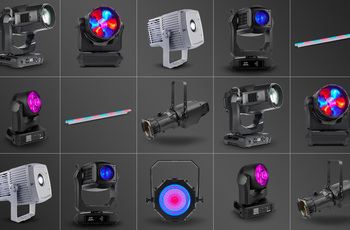
Companion Desktop adalah alat manajemen fixture, unggah firmware dan pemrograman standalone yang kompatibel dengan semua fixture Martin untuk kemudahan penggunaan maksimal. Aplikasi Companion Desktop disinkronkan dengan perpustakaan firmware Martin melalui Internet, sehingga tidak perlu lagi menelusuri halaman dukungan untuk menemukan firmware fixture terbaru.

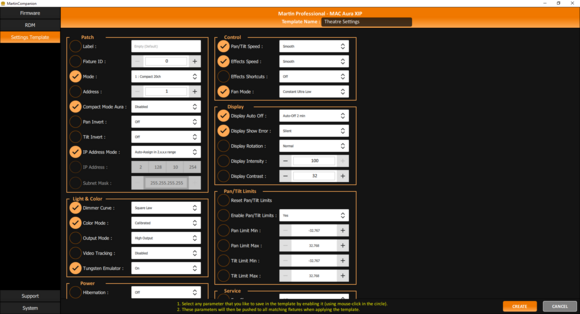
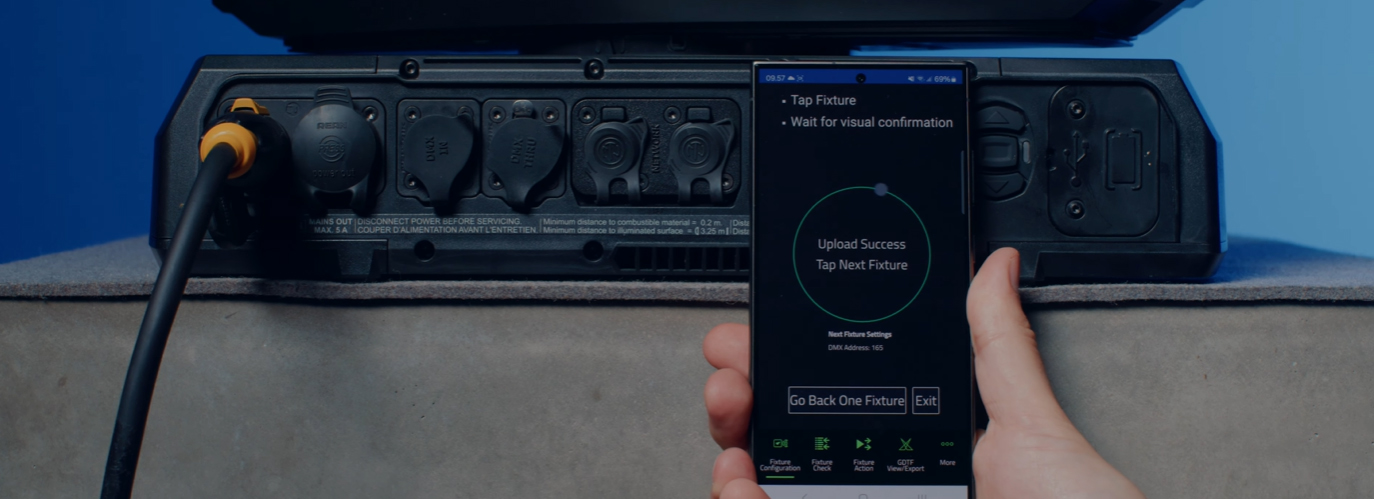
Integrasi RDM canggih memungkinkan semua fixture dikonfigurasi dan dipasang dari jarak jauh. Untuk memfasilitasi konfigurasi mudah dari banyak fixture sekaligus, sistem Konfigurasi Fixture memungkinkan serangkaian pengaturan fixture didorong ke semua fixture yang dipilih sekaligus. Alat Pengalamatan Cepat bawaan memungkinkan pengalamatan fixture hanya dengan satu klik per fixture.

Alat pemrograman standalone ergonomis bawaan memungkinkan fixture diprogram dengan hingga 20 scene dengan waktu hold dan fade individual. Fixture kemudian dapat menjalankan scene ini sepenuhnya tersinkronkan, tanpa komputer atau pengontrol yang terhubung. Pertunjukan standalone juga dapat disimpan, dibagikan, dan digunakan kembali nanti.

Companion Desktop juga secara otomatis disinkronkan dengan file GDTF buatan Martin di GDTF share. Memberikan Anda akses ke semua detail fixture seperti DMX Modes, DMX Channel Listings, Gobo Loadouts dan lainnya. File GDTF dapat dieksport langsung dari Companion Desktop untuk digunakan dengan perangkat lunak apa pun yang kompatibel dengan GDTF.

Juga periksa Companion Mobile, yang menawarkan beberapa fitur yang sama untuk perangkat mobile iOS dan Android.

  • Compatible with all Martin lighting fixtures

    Martin Companion can upload firmware to all Martin product ranges including MAC, ERA, ELP, VDO and Exterior.
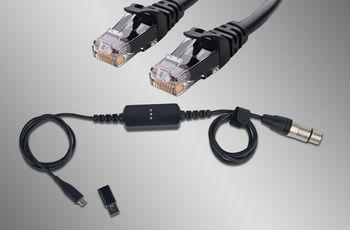
  • Fixture Connection via DMX or Network

    Connection between Martin Companion and the fixtures can be made via the Martin Companion Cable or a standard network interface.
  • Automatic Cloud Synchronization

    Online synchronization makes sure that you always have the latest fixture firmware and GDTF files with you. There’s no need to browse support pages to find the latest firmware or GDTF file, Martin Companion does this for you.
  • Export for update via USB or P3

    Firmware can also be exported out of Martin Companion to update a fixture via a USB memory device or Martin P3 System Controller as alternative to updating fixtures via Martin Companion.
  • Configure and Patch features via RDM or RDM over Art-Net

    The integrated RDM toolkit allows fixtures to be configured and patched remotely. Martin Companion supports standard RDM parameters, but also more advanced Martin-specific RDM parameters to configure fixtures to the best performance.
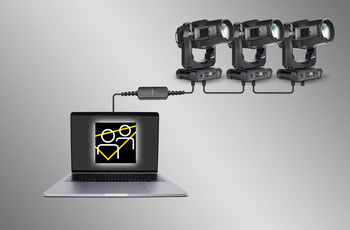
  • Fixture Settings Templates for Quick Deployment

    Update settings of multiple fixtures in a matter of seconds. Any combination of settings can be stored in a template and then pushed to all fixtures in the rig. Gone are the days of manually checking the settings on fixtures one-by-one.
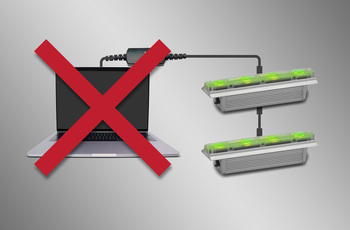
  • Stand-Alone Programming

    Shows of up to 20 scenes, with individual hold- and fade-times, can be programmed into select Martin fixtures using Martin Companion. The fixtures will run the show fully synchronized and without computer or controller connected.
  • GDTF View and Export

    View all Martin-made GDTF files to look up fixture details, and download them directly from within Martin Companion for easy access at all times.
featured content

Compatible with all Martin lighting fixtures

Martin Companion can upload firmware to all Martin product ranges including MAC, ERA, ELP, VDO and Exterior.

featured content

Fixture Connection via DMX or Network

Connection between Martin Companion and the fixtures can be made via the Martin Companion Cable or a standard network interface.

featured content

Automatic Cloud Synchronization

Online synchronization makes sure that you always have the latest fixture firmware and GDTF files with you. There’s no need to browse support pages to find the latest firmware or GDTF file, Martin Companion does this for you.

featured content

Export for update via USB or P3

Firmware can also be exported out of Martin Companion to update a fixture via a USB memory device or Martin P3 System Controller as alternative to updating fixtures via Martin Companion.

featured content

Configure and Patch features via RDM or RDM over Art-Net

The integrated RDM toolkit allows fixtures to be configured and patched remotely. Martin Companion supports standard RDM parameters, but also more advanced Martin-specific RDM parameters to configure fixtures to the best performance.

featured content

Fixture Settings Templates for Quick Deployment

Update settings of multiple fixtures in a matter of seconds. Any combination of settings can be stored in a template and then pushed to all fixtures in the rig. Gone are the days of manually checking the settings on fixtures one-by-one.

featured content

Stand-Alone Programming

Shows of up to 20 scenes, with individual hold- and fade-times, can be programmed into select Martin fixtures using Martin Companion. The fixtures will run the show fully synchronized and without computer or controller connected.

featured content

GDTF View and Export

View all Martin-made GDTF files to look up fixture details, and download them directly from within Martin Companion for easy access at all times.

Video


Fitur

  • Kompatibel dengan semua rangkaian fixture Martin termasuk MAC, ERA, ELP, VDO & Exterior
  • Sinkronisasi online otomatis dari library firmware dan library GDTF
  • Martin Companion Cable yang kokoh untuk menghubungkan fixture dengan komputer menggunakan DMX
  • Koneksi jaringan langsung untuk menghubungkan fixture dengan komputer menggunakan Art-Net / sACN
  • Aplikasi Desktop Companion diunduh gratis dari website Martin
  • Opsi ekspor untuk pembaruan fixture melalui perangkat memori USB atau P3 System Controller
  • Opsi ekspor untuk pembaruan mesin Atmospheric Effects melalui Epsilon 5 AVR Programmer
  • Fungsi RDM memungkinkan setiap pengaturan fixture dikonsultasikan dan diubah dari jarak jauh
  • Ekspor RDM ke CSV untuk pengumpulan data fixture yang mudah seperti nomor seri, detail patch, counter penggunaan dan lainnya
  • Konfigurasi Fixture memungkinkan penerapan pengaturan dengan cepat ke beberapa fixture sekaligus
  • Quick Addressing memungkinkan pengalamatan fixture hanya dengan satu klik per fixture
  • Pemrograman Stand-Alone dari fixture Martin pilihan
  • Simpan, Bagikan dan Gunakan Kembali pertunjukan Stand-Alone
  • Penampil GDTF dan alat ekspor

Spesifikasi

  • System Requirements

    Computer running Windows 10 or 11 (32 or 64-bit)
    Intel Core i3 or better processor
    4 GB RAM
    4 GB available hard disk space
    Display with Full HD or better resolution
    USB 1.1 (or higher) port (USB Type A or USB Type C) for connection of Companion Cable
    Ethernet port for RDM over Art-Net communication (if used)
    Full administrator rights on PC

    Supported Fixture Communication Protocols

    RDM (via Companion Cable)
    RDM over Art-Net (via standard Ethernet Port)
    Multiple proprietary fixture firmware upload protocols

    Supported RDM Parameters

    Fixture Configuration
    General: Manufacturer, Model, Label, Fixture ID
    Patch: Mode, Universe, Address, Compact Mode Aura, Pan Invert, Tilt Invert, Pan/Tilt Swap, Pixel Flip Mode, IP Settings
    UCM: SHoW ID, SHoW Key, Output Power, Antenna Type, Connection State, Module Manufacturer, Module Model, Module Firmware
    Light & Color: Dimmer Curve, Color Mode, Output Mode, Manual CTC, Manual Tint, Keylight Calibration, Gobo CT Correction, Video Tracking, Strobe Behavior, Tungsten Emulation, High Refresh
    Control: FollowSpot Mode, Pan/Tilt Speed, Effects Speed, Effects Shortcuts, Focus Tracking, Framing Mode, Hyper Zoom, Fan Mode, Extra Blackout
    Display: Display Auto Off, Display Show Error, Display Rotation, Display Intensity, Display Contrast
    Power: Power Limit, Hibernation, DMX Lost Mode, Standalone Mode, Reset via DMX, Lamp Off via DMX, Lamp On Mode, Lamp State, Power State, DC Output Control
    Outdoor: Auto Empty Water
    Pan/Tilt Limits: Enable Pan/Tilt Limits, Pan Limit Min, Pan Limit Max, Tilt Limit Min, Tilt Limit Max
    Details: Serial Number, UID, MAC Address, Protocol Version, Device Model ID, Art-Net OEM Code, Product Category, Firmware Version, Sub-Device Count
    Service: Status, Sensors Readout, Device Hours, Lamp Hours, Lamp Strikes, Power Cycles, Pixel Quantity

    Fixture Action
    Factory Defaults: Set Factory Defaults
    Reset Fixture: Warm Reset, Cold Reset
    Hibernation: Disable, Enable
    IP Settings: Reset IP Settings
    Pan/Tilt Limits: Reset Pan/Tilt Limits
    Outdoor Actions: Stop, Empty Head, Dry Off, Safe Parking
    Fan Clean: Stop, Start
    SelfTest: Stop, Test All, Test Pan/Tilt, Test Effects, Test LEDs, Identify

    Stand-Alone Programming
    Proprietary set of Martin RDM commands

    * Not all parameters are supported by all fixtures
    * Martin Companion uses a combination of standard RDM commands and Martin-specific RDM commands

    Supported Fixtures - Firmware Upload*

    Firmware Upload via DMX Cable:
    - All products from Martin MAC, ERA, ELP, RUSH and Exterior ranges
    - Select products from Martin VDO range
    Firmware Upload via Network:
    - Select products from Martin MAC, VDO and Exterior ranges
    Firmware Export and Upload into Fixture via USB stick:
    - Select products from Martin MAC and ERA ranges
    Firmware Export and Upload into Fixture via P3 System Controller:
    - All products from Martin VDO and VC ranges
    - Select products from Martin MAC and Exterior ranges
    Firmware Export and Upload into Fixture via Epsilon 5 AVR Programmer:
    - Atmospheric Effects in Martin Magnum and RUSH ranges

    * Detailed Overview can be found here.

    Supported Fixtures - Fixture Configuration

    Any fixture supporting RDM and/or RDM over Art-Net

    * Martin Companion uses a combination of standard RDM commands and Martin-specific RDM commands, which are not supported on non-Martin fixtures

    Supported Fixtures - Fixture Action

    Any fixture supporting RDM and/or RDM over Art-Net

    * Martin Companion uses a combination of standard RDM commands and Martin-specific RDM commands, which are not supported on non-Martin fixtures

    Supported Fixtures - Stand-Alone Programming

    Martin ELP Manet 8F
    Martin Exterior Dot Pro series
    Martin Exterior Linear Pro series
    Martin Exterior Projection Pro series
    Martin Exterior Wash Pro series
    Martin MAC Aura Raven XIP
    Martin MAC Encore Two
    Martin MAC One
    Martin MAC One Beam
    Martin MAC Viper XIP
    Martin VDO Sceptron XB

    Supported Fixtures - GDTF View & Export All Martin products
    Supported Fixtures - Spare Parts Finder All Martin products
  • Physical (Companion Cable) Length: 68 mm (2.7 in.) Width: 29 mm (1.2 in.) Height: 17 mm (0.7 in.) Weight: 99 g (3.5 oz.)
    Control/User Interface (Companion Cable) Configuration and management: Companion Desktop Software Device status: 3 x status LEDs (USB, DMX & Status)
    Construction (Companion Cable) Housing: Plastic Color: Matte Black Protection rating: IP20 Non-domestic use in dry location only
    Connections (Companion Cable) Computer Interface: USB 2.0 Type C (adapter to USB Type A included) DMX/RDM data: 5-pin locking XLR
    Electrical (Companion Cable) Power Rating: 5 VDC over USB Maximum current draw: 150 mA
    Thermal (Companion Cable) Maximum ambient temperature (Ta max.): 50° C (122° F) Minimum ambient temperature (Ta min.): 0° C (32° F)
    Approvals (Companion Cable) EMC: CAN ICES-3 U(B) / NMB-3 (B)
    Related Items

    Companion Mobile Software: Free download from App Store and Google Play

    Ordering Information

    Companion Desktop Software: Free download from www.martin.com
    Companion Cable: P/N 91616091

Unduhan

Manuals
  Versi Bahasa Ukuran Diunggah
file type icon Martin Companion - Getting Started Video
en versi 2.0.0, diperbarui: Des 2023
2.0.0  en  Des 2023
file type icon Martin Companion Cable - User Manual
en versi C, diperbarui: Nov 2024
en  234 KB Nov 2024
Compliances
  Bahasa Ukuran Diunggah
en  287 KB Nov 2023
en  498 KB Nov 2023
Software
  Versi Ukuran Diunggah
Windows download icon Companion Desktop - Windows
versi 2.2.0, diperbarui: Apr 2026
2.2.0   96,1 MB Apr 2026
Service Notes
  Versi Bahasa Ukuran Diunggah
en  723 KB Nov 2023

Jika ada tautan di atas yang menampilkan karakter aneh di browser Anda, klik kanan file tersebut untuk menyimpannya ke komputer Anda.

Berita

HARMAN Pro Insights

Designing Smarter Workflows with Precision Lighting Fixture Management Tools feature

Designing Smarter Workflows with Precision Lighting Fixture Management Tools

    Professional lighting setups demand precise configuration, reliable diagnostics, and up-to-date firmware. Yet DMX addressing, firmware mismatches, and manual data entry often slow down designers, rental houses, and system techs. Effective lighting fixture management tools can eliminate these pain points and keep every show

CONTINUE READING

Dukungan/FAQ

HARMAN Professional Solutions: