Companion Desktop

أداة الإدارة وتحميل البرامج الثابتة لجميع أجهزة Martin

Companion Desktop

يعتبر Companion Desktop أداة إدارة التركيبات وتحميل البرامج الثابتة والبرمجة المستقلة المتوافقة مع جميع تركيبات Martin لتوفير أقصى درجات سهولة الاستخدام. يتم مزامنة تطبيق Companion Desktop مع مكتبة Martin عبر الإنترنت، مما يلغي الحاجة إلى البحث في صفحات الدعم للعثور على أحدث برنامج ثابت للتركيبات أو نظرة عامة على قطع الغيار.

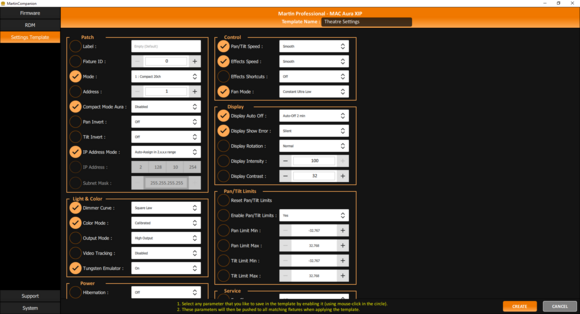
يسمح التكامل المتقدم لـ RDM بتكوين وتصحيح جميع التركيبات عن بعد. لتسهيل التكوين السريع للعديد من التركيبات في المرة الواحدة، يتيح نظام تكوين التركيبات دفع مجموعة كاملة من إعدادات التركيبات إلى جميع التركيبات المختارة في وقت واحد. تتيح أداة Quick Addressing المدمجة معالجة التركيبات بنقرة واحدة فقط لكل تركيبة.

توفر أداة البرمجة المستقلة المدمجة والمريحة إمكانية برمجة التركيبات بما يصل إلى 20 مشهد مع أوقات الإيقاف والتلاشي الفردية. يمكن للتركيبات بعد ذلك تشغيل هذه المشاهد بشكل متزامن تماماً، بدون أي كمبيوتر أو جهاز تحكم متصل. يمكن أيضاً تخزين عروض المشاهد المستقلة ومشاركتها وإعادة استخدامها لاحقاً.

يتم مزامنة Companion Desktop أيضاً تلقائياً مع ملفات GDTF التي صنعتها Martin على مشاركة GDTF. مما يمنحك الوصول إلى جميع تفاصيل التركيبات مثل أوضاع DMX وقوائم قنوات DMX وتحميلات Gobo والمزيد. يمكن تصدير ملفات GDTF مباشرة من Companion Desktop للاستخدام مع أي برنامج متوافق مع GDTF.

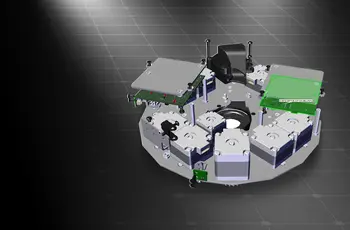
يوفر محرك قطع الغيار المدمج الوصول إلى نموذج ثلاثي الأبعاد لكل تركيبة Martin، والذي يمكن تفكيكه لتحديد قطع الغيار.

تحقق أيضاً من Companion Mobile، الذي يوفر بعض الميزات نفسها لأجهزة iOS و Android المحمولة.

  • Compatible with all Martin lighting fixtures

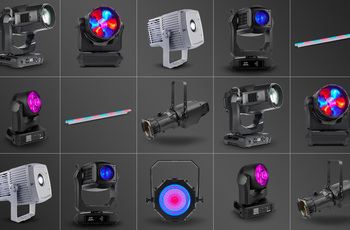
    Martin Companion can upload firmware to all Martin product ranges including MAC, ERA, ELP, VDO and Exterior.
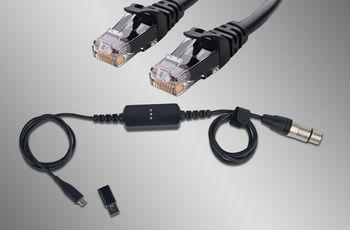
  • Fixture Connection via DMX or Network

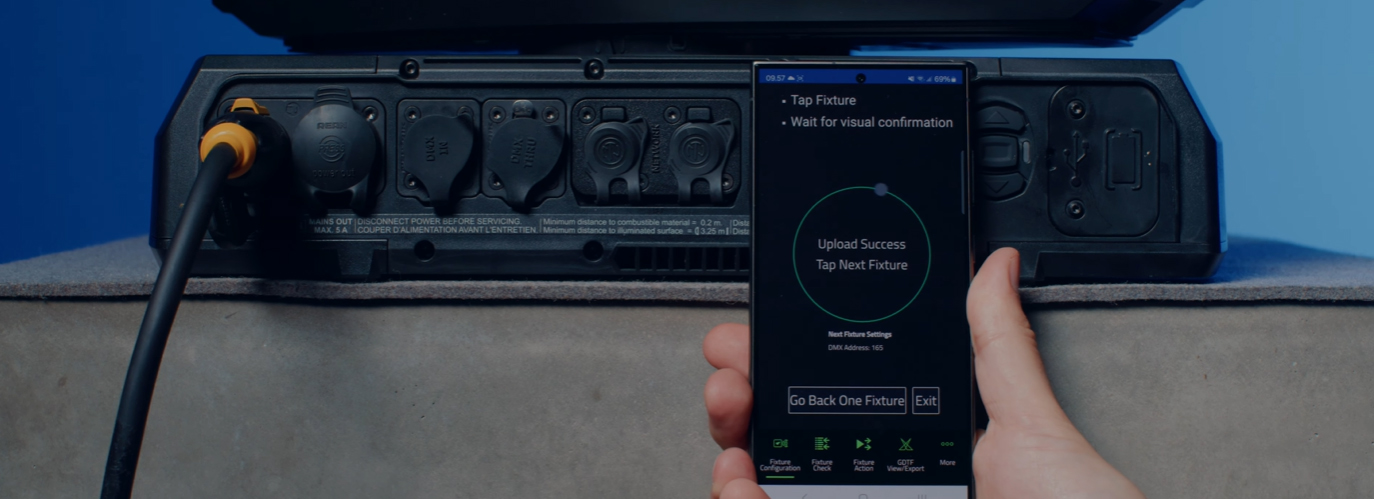
    Connection between Martin Companion and the fixtures can be made via the Martin Companion Cable or a standard network interface.
  • Automatic Cloud Synchronization

    Online synchronization makes sure that you always have the latest fixture firmware and GDTF files with you. There’s no need to browse support pages to find the latest firmware or GDTF file, Martin Companion does this for you.
  • Export for update via USB or P3

    Firmware can also be exported out of Martin Companion to update a fixture via a USB memory device or Martin P3 System Controller as alternative to updating fixtures via Martin Companion.
  • Configure and Patch features via RDM or RDM over Art-Net

    The integrated RDM toolkit allows fixtures to be configured and patched remotely. Martin Companion supports standard RDM parameters, but also more advanced Martin-specific RDM parameters to configure fixtures to the best performance.
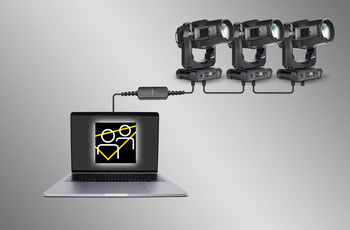
  • Fixture Settings Templates for Quick Deployment

    Update settings of multiple fixtures in a matter of seconds. Any combination of settings can be stored in a template and then pushed to all fixtures in the rig. Gone are the days of manually checking the settings on fixtures one-by-one.
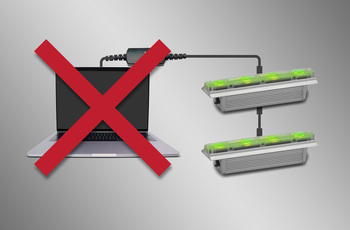
  • Stand-Alone Programming

    Shows of up to 20 scenes, with individual hold- and fade-times, can be programmed into select Martin fixtures using Martin Companion. The fixtures will run the show fully synchronized and without computer or controller connected.
  • GDTF View and Export

    View all Martin-made GDTF files to look up fixture details, and download them directly from within Martin Companion for easy access at all times.
featured content

Compatible with all Martin lighting fixtures

Martin Companion can upload firmware to all Martin product ranges including MAC, ERA, ELP, VDO and Exterior.

featured content

Fixture Connection via DMX or Network

Connection between Martin Companion and the fixtures can be made via the Martin Companion Cable or a standard network interface.

featured content

Automatic Cloud Synchronization

Online synchronization makes sure that you always have the latest fixture firmware and GDTF files with you. There’s no need to browse support pages to find the latest firmware or GDTF file, Martin Companion does this for you.

featured content

Export for update via USB or P3

Firmware can also be exported out of Martin Companion to update a fixture via a USB memory device or Martin P3 System Controller as alternative to updating fixtures via Martin Companion.

featured content

Configure and Patch features via RDM or RDM over Art-Net

The integrated RDM toolkit allows fixtures to be configured and patched remotely. Martin Companion supports standard RDM parameters, but also more advanced Martin-specific RDM parameters to configure fixtures to the best performance.

featured content

Fixture Settings Templates for Quick Deployment

Update settings of multiple fixtures in a matter of seconds. Any combination of settings can be stored in a template and then pushed to all fixtures in the rig. Gone are the days of manually checking the settings on fixtures one-by-one.

featured content

Stand-Alone Programming

Shows of up to 20 scenes, with individual hold- and fade-times, can be programmed into select Martin fixtures using Martin Companion. The fixtures will run the show fully synchronized and without computer or controller connected.

featured content

GDTF View and Export

View all Martin-made GDTF files to look up fixture details, and download them directly from within Martin Companion for easy access at all times.

الفيديوهات


الميزات

  • Compatible with all Martin fixture ranges including MAC, ERA, ELP, VDO & Exterior
  • Automatic online synchronization of fixture firmware library, spare parts finder library and GDTF library
  • Robust Martin Companion Cable to connect fixtures with computer using DMX
  • Direct network connection to connect fixtures with computer using Art-Net / sACN
  • Companion Desktop Application downloaded free of charge from Martin website
  • Optional export for fixture update via USB memory device or P3 System Controller
  • Optional export for Atmospheric Effects machine update via Epsilon 5 AVR Programmer
  • RDM function allows every fixture setting to be consulted and changed remotely
  • RDM export to CSV for easy collection of fixture data such as serial numbers, patch details, usage counters and more
  • Fixture Configuration enables quick deployment of settings to multiple fixtures at once
  • Quick Addressing allows for addressing of fixtures with just a single click per fixture
  • Stand-Alone Programming of select Martin fixtures
  • Save, Share and Re-Use Stand-Alone shows
  • GDTF viewer and export tool
  • Spare Parts Finder

المواصفات

  • System Requirements

    Computer running Windows 10 or 11 (32 or 64-bit)
    Intel Core i3 or better processor
    4 GB RAM
    4 GB available hard disk space
    Display with Full HD or better resolution
    USB 1.1 (or higher) port (USB Type A or USB Type C) for connection of Companion Cable
    Ethernet port for RDM over Art-Net communication (if used)
    Full administrator rights on PC

    Supported Fixture Communication Protocols

    RDM (via Companion Cable)
    RDM over Art-Net (via standard Ethernet Port)
    Multiple proprietary fixture firmware upload protocols

    Supported RDM Parameters

    Fixture Configuration
    General: Manufacturer, Model, Label, Fixture ID
    Patch: Mode, Universe, Address, Compact Mode Aura, Pan Invert, Tilt Invert, Pan/Tilt Swap, Pixel Flip Mode, IP Settings
    UCM: SHoW ID, SHoW Key, Output Power, Antenna Type, Connection State, Module Manufacturer, Module Model, Module Firmware
    Light & Color: Dimmer Curve, Color Mode, Output Mode, Manual CTC, Manual Tint, Keylight Calibration, Gobo CT Correction, Video Tracking, Strobe Behavior, Tungsten Emulation, High Refresh
    Control: FollowSpot Mode, Pan/Tilt Speed, Effects Speed, Effects Shortcuts, Focus Tracking, Framing Mode, Hyper Zoom, Fan Mode, Extra Blackout
    Display: Display Auto Off, Display Show Error, Display Rotation, Display Intensity, Display Contrast
    Power: Power Limit, Hibernation, DMX Lost Mode, Standalone Mode, Reset via DMX, Lamp Off via DMX, Lamp On Mode, Lamp State, Power State, DC Output Control
    Outdoor: Auto Empty Water
    Pan/Tilt Limits: Enable Pan/Tilt Limits, Pan Limit Min, Pan Limit Max, Tilt Limit Min, Tilt Limit Max
    Details: Serial Number, UID, MAC Address, Protocol Version, Device Model ID, Art-Net OEM Code, Product Category, Firmware Version, Sub-Device Count
    Service: Status, Sensors Readout, Device Hours, Lamp Hours, Lamp Strikes, Power Cycles, Pixel Quantity

    Fixture Action
    Factory Defaults: Set Factory Defaults
    Reset Fixture: Warm Reset, Cold Reset
    Hibernation: Disable, Enable
    IP Settings: Reset IP Settings
    Pan/Tilt Limits: Reset Pan/Tilt Limits
    Outdoor Actions: Stop, Empty Head, Dry Off, Safe Parking
    Fan Clean: Stop, Start
    SelfTest: Stop, Test All, Test Pan/Tilt, Test Effects, Test LEDs, Identify

    Stand-Alone Programming
    Proprietary set of Martin RDM commands

    * Not all parameters are supported by all fixtures
    * Martin Companion uses a combination of standard RDM commands and Martin-specific RDM commands

    Supported Fixtures - Firmware Upload*

    Firmware Upload via DMX Cable:
    - All products from Martin MAC, ERA, ELP, RUSH and Exterior ranges
    - Select products from Martin VDO range
    Firmware Upload via Network:
    - Select products from Martin MAC, VDO and Exterior ranges
    Firmware Export and Upload into Fixture via USB stick:
    - Select products from Martin MAC and ERA ranges
    Firmware Export and Upload into Fixture via P3 System Controller:
    - All products from Martin VDO and VC ranges
    - Select products from Martin MAC and Exterior ranges
    Firmware Export and Upload into Fixture via Epsilon 5 AVR Programmer:
    - Atmospheric Effects in Martin Magnum and RUSH ranges

    * Detailed Overview can be found here.

    Supported Fixtures - Fixture Configuration

    Any fixture supporting RDM and/or RDM over Art-Net

    * Martin Companion uses a combination of standard RDM commands and Martin-specific RDM commands, which are not supported on non-Martin fixtures

    Supported Fixtures - Fixture Action

    Any fixture supporting RDM and/or RDM over Art-Net

    * Martin Companion uses a combination of standard RDM commands and Martin-specific RDM commands, which are not supported on non-Martin fixtures

    Supported Fixtures - Stand-Alone Programming

    Martin ELP Manet 8F
    Martin Exterior Dot Pro series
    Martin Exterior Linear Pro series
    Martin Exterior Projection Pro series
    Martin Exterior Wash Pro series
    Martin MAC Aura Raven XIP
    Martin MAC Encore Two
    Martin MAC One
    Martin MAC One Beam
    Martin MAC Viper XIP
    Martin VDO Sceptron XB

    Supported Fixtures - GDTF View & Export All Martin products
    Supported Fixtures - Spare Parts Finder All Martin products
  • Physical (Companion Cable) Length: 68 mm (2.7 in.) Width: 29 mm (1.2 in.) Height: 17 mm (0.7 in.) Weight: 99 g (3.5 oz.)
    Control/User Interface (Companion Cable) Configuration and management: Companion Desktop Software Device status: 3 x status LEDs (USB, DMX & Status)
    Construction (Companion Cable) Housing: Plastic Color: Matte Black Protection rating: IP20 Non-domestic use in dry location only
    Connections (Companion Cable) Computer Interface: USB 2.0 Type C (adapter to USB Type A included) DMX/RDM data: 5-pin locking XLR
    Electrical (Companion Cable) Power Rating: 5 VDC over USB Maximum current draw: 150 mA
    Thermal (Companion Cable) Maximum ambient temperature (Ta max.): 50° C (122° F) Minimum ambient temperature (Ta min.): 0° C (32° F)
    Approvals (Companion Cable) EMC: CAN ICES-3 U(B) / NMB-3 (B)
    Related Items

    Companion Mobile Software: Free download from App Store and Google Play

    Ordering Information

    Companion Desktop Software: Free download from www.martin.com
    Companion Cable: P/N 91616091

التنزيلات

Manuals
  الإصدار اللغة الحجم تاريخ التحميل
file type icon Martin Companion - Getting Started Video
en الإصدار 2.0.0, تم التحديث: ديسمبر 2023
2.0.0  en  ديسمبر 2023
file type icon Martin Companion Cable - User Manual
en الإصدار C, تم التحديث: نوفمبر 2024
en  234 KB نوفمبر 2024
Compliances
  اللغة الحجم تاريخ التحميل
file type icon Martin Companion Cable - FCC Declaration of Conformity
en تم التحديث: نوفمبر 2023
en  287 KB نوفمبر 2023
file type icon Martin Companion Cable - Declaration of Conformity
en تم التحديث: نوفمبر 2023
en  498 KB نوفمبر 2023
Software
  الإصدار الحجم تاريخ التحميل
Windows download icon Companion Desktop - Windows
الإصدار 2.2.0, تم التحديث: أبريل 2026
2.2.0   96.1 MB أبريل 2026
Service Notes
  الإصدار اللغة الحجم تاريخ التحميل
file type icon Updating Legacy USB-DMX devices (only supported on Martin Companion 1.6.0 and older)
en الإصدار A, تم التحديث: نوفمبر 2023
en  723 KB نوفمبر 2023

إذا أدت أي من الروابط أعلاه إلى أحرف غريبة في متصفحك، يرجى النقر بزر الماوس الأيمن على الملف لحفظه على جهاز الكمبيوتر الخاص بك.

الأخبار

HARMAN Pro Insights

Designing Smarter Workflows with Precision Lighting Fixture Management Tools feature

Designing Smarter Workflows with Precision Lighting Fixture Management Tools

    Professional lighting setups demand precise configuration, reliable diagnostics, and up-to-date firmware. Yet DMX addressing, firmware mismatches, and manual data entry often slow down designers, rental houses, and system techs. Effective lighting fixture management tools can eliminate these pain points and keep every show

CONTINUE READING

الدعم/الأسئلة الشائعة