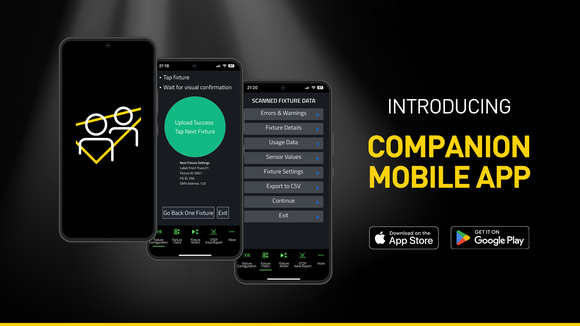
Companion Mobile

モバイル、アプリベース フィクスチャ構成・診断ツール

Companion Mobile

Companion Mobileは、Companionフィクスチャ管理、ファームウェアアップロード、スタンドアロンプログラミングツールのアプリベース版です。Martin NFC(近距離通信)対応フィクスチャと互換性があり、MAC Viper XIP、MAC Aura Raven XIP、MAC Encore Two、ELP Manet 8Fを含む多くの今後予定されているフィクスチャに対応しています。この無料アプリはiOSおよびAndroidモバイルデバイス向けに利用可能です。

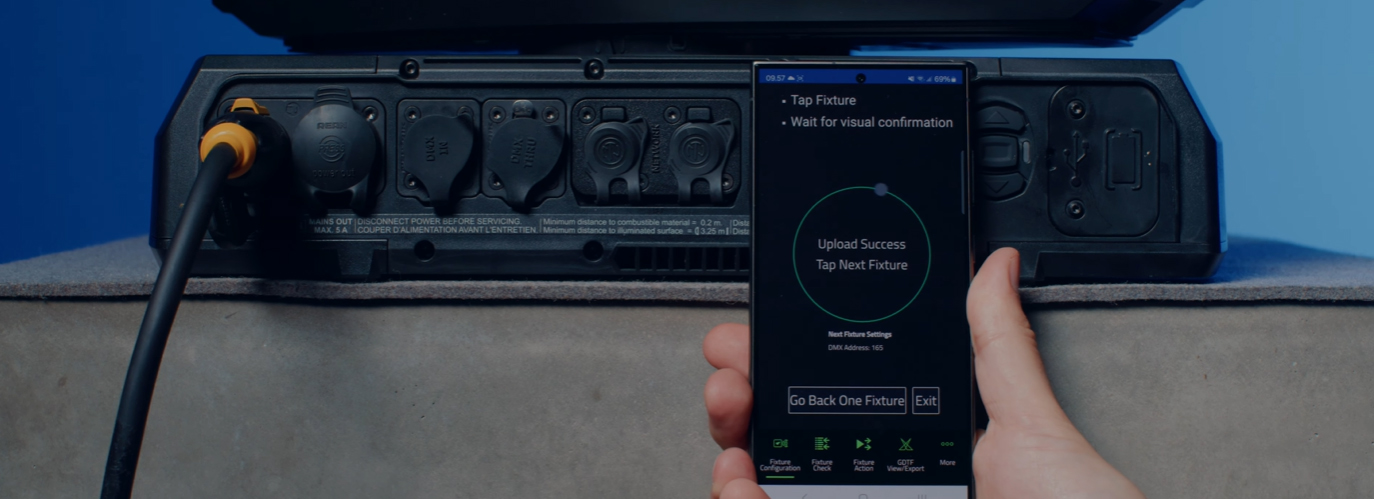
人気のあるCompanion Desktopアプリケーションと同様ですが、Companion MobileはNFCを利用してワイヤレス通信を確立し、フィクスチャ設定をさらに簡単かつ容易にします。NFCインターフェースの利点は、フィクスチャの電源をオンにすることなく設定できることです。フィクスチャがまだフライトケースの中にある場合でも、スマートフォンでフィクスチャのディスプレイに対してタップするだけで、フィクスチャの設定に必要なすべてを行うことができます。

Companion Mobile バージョン1.0.0は、将来のリリースで追加機能が予定されている4つの主要機能を備えています。これらには、フィクスチャ設定を簡単に変更するためのFixture Configureツール、フィクスチャの迅速な診断用Fixture Checkツール、シンプルなフィクスチャアクション開始用Fixture Actionツール、ならびにMartin製GDTFファイルの閲覧およびフィクスチャ詳細情報の確認用GDTF View & Exportが含まれます。

Companion Mobileはインターネットを介してMartinのライブラリと同期され、手動ダウンロードの必要がなくなります。さらに、GDTF共有上のMartin製GDTFファイルと自動的に同期されます。これにより、DMXモード、DMXチャネルリスト、ゴボロードアウトなど、すべてのフィクスチャ詳細情報にアクセスできます。GDTFファイルはCompanionから直接エクスポートでき、GDTF対応ソフトウェアで使用できます。

Companion Desktopもご確認ください。こちらはWindowsを実行するコンピューター向けに同様の機能を提供しています。

ビデオ


特長

  • Compatible with Martin NFC-enabled fixtures, including MAC Viper XIP, MAC Aura Raven XIP, MAC Encore Two, ELP Manet 8F and many more fixtures to come
  • Automatic online synchronization of fixture database and GDTF library
  • Fixture Configure offers the ability to easily change the settings of one or multiple fixtures at once
  • Fixture Check enables the ability to quickly diagnose fixtures and export data to a CSV file
  • Fixture Action allows common tasks to be executed with a single click
  • Capability to read all data from fixtures, even when they are powered off
  • Capability to configure fixtures, even before powering them up
  • Includes an integrated GDTF viewer and export tool

仕様

  • System Requirements

    Android: Version 12 or newer
    iOS: Version 13 or newer
    Storage: 250 MB available storage space

    Supported Fixture Communication Protocols NFC
    Supported NFC Parameters

    Fixture Configuration
    Patch: Label, Fixture ID, P3 ID, DMX Mode, DMX Address, DMX Universe, Compact Mode Aura, Pan Invert, Tilt Invert, Pan/Tilt Swap, PixelFlip, IP Address, Subnet Mask
    Universal Connect Module: SHoW ID, SHoW Key, Output Power, Antenna Type, RSSI, RX Quality, Connection State, Module Manufacturer, Module Model, Module Firmware
    Light and Colour: Dimmer Curve, Color Mode, Color Boost, Output Mode, Manual CTC, Manual Tint, Keylight Calibration, Gobo CT Correction, End Compensation, Video Tracking, Strobe Behavior, Tungsten Emulation
    Control: FollowSpot Mode, Pan/Tilt Speed, Effects Speed, Effects Shortcuts, Focus Tracking, Framing Mode, HyperZoom, Fan Mode, Cooling Mode, Studio Mode, BeamShaper, Fan Clean
    Display: Display, Display Show Errors, Display Rotation, Display Intensity, Display Contrast
    Power: Power Limit, Hibernation, Offline Mode, Stand-Alone Mode, Reset via DMX
    Outdoor: Auto Empty Water, Outdoor Actions
    Pan/Tilt Limits: Reset Pan/Tilt Limits, Enable Pan/Tilt Limits, Pan Limit Min, Pan Limit Max, Tilt Limit Min, Tilt Limit Max
    Details: Serial Number, RDM UID, MAC Address, RDM Protocol Version, RDM Device Model ID, Art-Net OEM Code, Product Category, Firmware Version, Sub-Device Count
    Service: SelfTest, Device Hours Total, Device Hours Resettable, Lamp Hours Total, Lamp Hours Resettable, Power Cycles Total, Power Cycles Resettable, Fixture Length

    Fixture Check
    Fixture Details: Serial Number, RDM UID, MAC Address, Firmware Version, RDM Device Model ID, Art-Net OEM Code
    Errors and Warnings: Error Messages, Warning Messages
    Usage Data: Device Hours Total, Device Hours Resettable, Lamp Hours Total, Lamp Hours Resettable, Power Cycles Total, Power Cycles Resettable
    Sensor Values: Temperatures, Fan Speeds
    Fixture Settings: same as fixture configuration

    Fixture Action
    Factory Defaults: Set Factory Defaults
    Reset Fixture: Warm Reset, Cold Reset
    Hibernation: Disable, Enable
    IP Settings: Reset IP Settings
    Pan/Tilt Limits: Reset Pan/Tilt Limits
    Outdoor Actions: Stop, Empty Head, Dry Off, Safe Parking
    Fan Clean: Stop, Start
    SelfTest: Stop, Test All, Test Pan/Tilt, Test Effects, Test LEDs, Identify
    Reset Counters: Reset Device Hours, Reset Lamp Hours, Reset Power Cycles

    * Not all parameters are supported by all fixtures
    Supported Fixtures - Fixture Configuration

    - ELP Manet 8F
    - MAC Aura Raven XIP
    - MAC Encore Two
    - MAC Viper XIP

  • Supported Fixtures - Fixture Check

    - ELP Manet 8F
    - MAC Aura Raven XIP
    - MAC Encore Two
    - MAC Viper XIP

    Supported Fixtures - Fixture Action

    - ELP Manet 8F
    - MAC Aura Raven XIP
    - MAC Encore Two

    - MAC Viper XIP

    Supported Fixtures - GDTF View & Export All Martin products
    Related Items

    Companion Desktop Software: Free download from www.martin.com

    Ordering Information

    Companion Mobile Software: Free download from App Store and Google Play

ダウンロード

Software
  バージョン サイズ アップロード日
iOS download icon Companion Mobile - iOS (App Store)
バージョン 1.0.3, リリース日: 2025年5月
1.0.3   2025年5月
Android download icon Companion Mobile - Android (Play Store)
バージョン 1.0.3, リリース日: 2025年5月
1.0.3   2025年5月
Android download icon Companion Mobile - Android (Manual Installation)
バージョン 1.0.3, 更新: 2026年4月
1.0.3   99.3MB 2026年4月

上記のリンクをクリックしてブラウザで文字化けが発生する場合は、ファイルを右クリックしてコンピューターに保存してください。

ニュース

HARMAN Pro Insights

Designing Smarter Workflows with Precision Lighting Fixture Management Tools feature

Designing Smarter Workflows with Precision Lighting Fixture Management Tools

    Professional lighting setups demand precise configuration, reliable diagnostics, and up-to-date firmware. Yet DMX addressing, firmware mismatches, and manual data entry often slow down designers, rental houses, and system techs. Effective lighting fixture management tools can eliminate these pain points and keep every show

CONTINUE READING

サポート/FAQ