Companion Mobile

基于移动应用的灯具配置与诊断工具

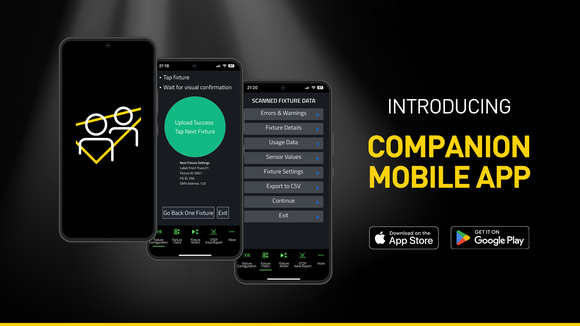
Companion Mobile 是 Companion 灯具管理、固件上传和独立编程工具的应用程序版本。它兼容支持 Martin NFC(近场通信)的灯具,包括 MAC Viper XIP、MAC Aura Raven XIP、MAC Encore Two、ELP Manet 8F,未来还将支持更多灯具。此免费应用程序适用于 iOS 和 Android 移动设备。

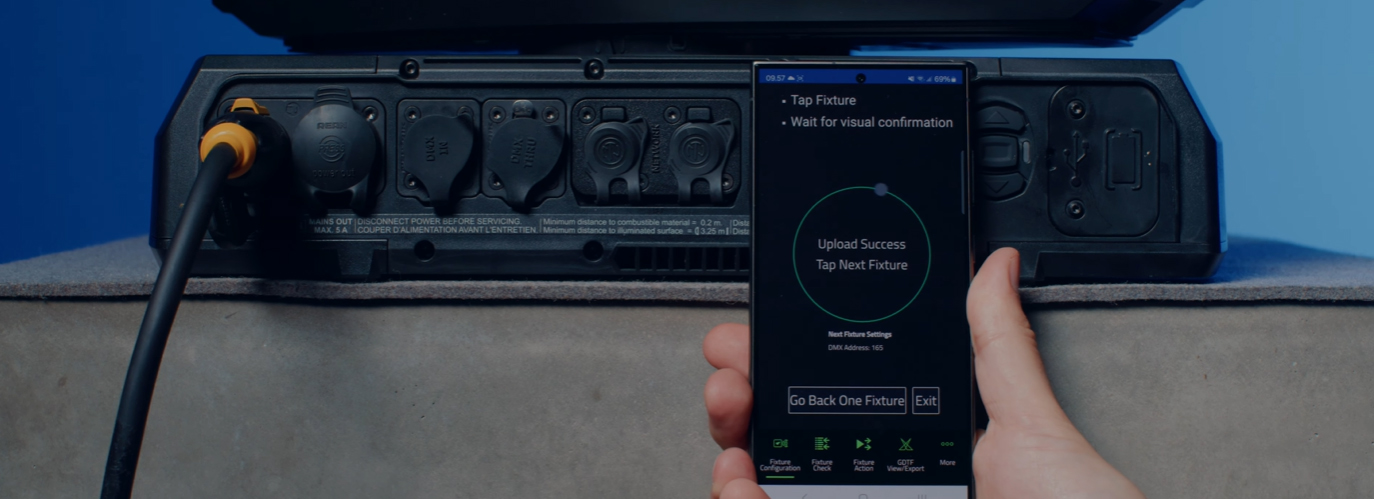
Companion Mobile 与广受欢迎的 Companion Desktop 应用程序类似,但采用 NFC 建立无线通信,进一步简化灯具配置流程。NFC 接口的优势在于灯具无需通电即可完成配置。即使灯具仍存放在航空箱内,只需用智能手机轻触灯具显示屏,即可完成灯具配置。

Companion Mobile 1.0.0 版本提供四项关键功能,并计划在未来版本中增加更多功能。这些功能包括:灯具配置工具(用于轻松更改灯具设置)、灯具检查工具(用于快速诊断灯具状况)、灯具操作工具(用于启动简单的灯具动作),以及 GDTF 查看与导出功能(用于浏览 Martin 制作的 GDTF 文件、查询灯具详情)。

Companion Mobile 通过互联网与 Martin 资料库同步,无需手动下载。此外,它会自动与 GDTF 共享平台上由 Martin 制作的 GDTF 文件同步,从而获取全部灯具详情,如 DMX 模式、DMX 通道列表、Gobo 配置等。GDTF 文件可直接从 Companion 导出,用于任何兼容 GDTF 的软件。

另请查看 Companion Desktop,它为运行 Windows 的计算机提供部分相同的功能。

视频


特点

  • 兼容 Martin 支持 NFC 的灯具,包括 MAC Viper XIP、MAC Aura Raven XIP、MAC Encore Two、ELP Manet 8F 以及更多即将推出的灯具
  • 灯具数据库与 GDTF 库自动在线同步
  • 灯具配置功能可轻松地一次性修改一个或多个灯具的设置
  • 灯具检查功能可快速诊断灯具,并将数据导出为 CSV 文件
  • 灯具操作功能支持单击执行常见任务
  • 即使灯具处于断电状态,仍可读取其全部数据
  • 即使在灯具通电之前,仍可对其进行配置
  • 内置集成的 GDTF 查看器与导出工具

性能

  • System Requirements

    Android: Version 12 or newer
    iOS: Version 13 or newer
    Storage: 250 MB available storage space

    Supported Fixture Communication Protocols NFC
    Supported NFC Parameters

    Fixture Configuration
    Patch: Label, Fixture ID, P3 ID, DMX Mode, DMX Address, DMX Universe, Compact Mode Aura, Pan Invert, Tilt Invert, Pan/Tilt Swap, PixelFlip, IP Address, Subnet Mask
    Universal Connect Module: SHoW ID, SHoW Key, Output Power, Antenna Type, RSSI, RX Quality, Connection State, Module Manufacturer, Module Model, Module Firmware
    Light and Colour: Dimmer Curve, Color Mode, Color Boost, Output Mode, Manual CTC, Manual Tint, Keylight Calibration, Gobo CT Correction, End Compensation, Video Tracking, Strobe Behavior, Tungsten Emulation
    Control: FollowSpot Mode, Pan/Tilt Speed, Effects Speed, Effects Shortcuts, Focus Tracking, Framing Mode, HyperZoom, Fan Mode, Cooling Mode, Studio Mode, BeamShaper, Fan Clean
    Display: Display, Display Show Errors, Display Rotation, Display Intensity, Display Contrast
    Power: Power Limit, Hibernation, Offline Mode, Stand-Alone Mode, Reset via DMX
    Outdoor: Auto Empty Water, Outdoor Actions
    Pan/Tilt Limits: Reset Pan/Tilt Limits, Enable Pan/Tilt Limits, Pan Limit Min, Pan Limit Max, Tilt Limit Min, Tilt Limit Max
    Details: Serial Number, RDM UID, MAC Address, RDM Protocol Version, RDM Device Model ID, Art-Net OEM Code, Product Category, Firmware Version, Sub-Device Count
    Service: SelfTest, Device Hours Total, Device Hours Resettable, Lamp Hours Total, Lamp Hours Resettable, Power Cycles Total, Power Cycles Resettable, Fixture Length

    Fixture Check
    Fixture Details: Serial Number, RDM UID, MAC Address, Firmware Version, RDM Device Model ID, Art-Net OEM Code
    Errors and Warnings: Error Messages, Warning Messages
    Usage Data: Device Hours Total, Device Hours Resettable, Lamp Hours Total, Lamp Hours Resettable, Power Cycles Total, Power Cycles Resettable
    Sensor Values: Temperatures, Fan Speeds
    Fixture Settings: same as fixture configuration

    Fixture Action
    Factory Defaults: Set Factory Defaults
    Reset Fixture: Warm Reset, Cold Reset
    Hibernation: Disable, Enable
    IP Settings: Reset IP Settings
    Pan/Tilt Limits: Reset Pan/Tilt Limits
    Outdoor Actions: Stop, Empty Head, Dry Off, Safe Parking
    Fan Clean: Stop, Start
    SelfTest: Stop, Test All, Test Pan/Tilt, Test Effects, Test LEDs, Identify
    Reset Counters: Reset Device Hours, Reset Lamp Hours, Reset Power Cycles

    * Not all parameters are supported by all fixtures
    Supported Fixtures - Fixture Configuration

    - ELP Manet 8F
    - MAC Aura Raven XIP
    - MAC Encore Two
    - MAC Viper XIP

  • Supported Fixtures - Fixture Check

    - ELP Manet 8F
    - MAC Aura Raven XIP
    - MAC Encore Two
    - MAC Viper XIP

    Supported Fixtures - Fixture Action

    - ELP Manet 8F
    - MAC Aura Raven XIP
    - MAC Encore Two

    - MAC Viper XIP

    Supported Fixtures - GDTF View & Export All Martin products
    Related Items

    Companion Desktop Software: Free download from www.martin.com

    Ordering Information

    Companion Mobile Software: Free download from App Store and Google Play

下载

Software
  版本 大小 上传日期
iOS download icon Companion Mobile - iOS (App Store)
版本 1.0.3, 发布: 5月 2025
1.0.3   5月 2025
Android download icon Companion Mobile - Android (Play Store)
版本 1.0.3, 发布: 5月 2025
1.0.3   5月 2025
Android download icon Companion Mobile - Android (Manual Installation)
版本 1.0.3, 更新: 4月 2026
1.0.3   99.3 MB 4月 2026

如果上述任何链接在您的浏览器中显示为奇怪的字符,请右键点击文件以将其保存到您的计算机。

新闻

哈曼专业洞察

Designing Smarter Workflows with Precision Lighting Fixture Management Tools feature

Designing Smarter Workflows with Precision Lighting Fixture Management Tools

    Professional lighting setups demand precise configuration, reliable diagnostics, and up-to-date firmware. Yet DMX addressing, firmware mismatches, and manual data entry often slow down designers, rental houses, and system techs. Effective lighting fixture management tools can eliminate these pain points and keep every show

CONTINUE READING

支援/最常见问题

HARMAN Professional Solutions: