Companion Mobile

MOBILT, APP-BASERET KONFIGURERINGS- OG DIAGNOSTICERINGSVÆRKTØJ TIL FIXTURES

Companion Mobile

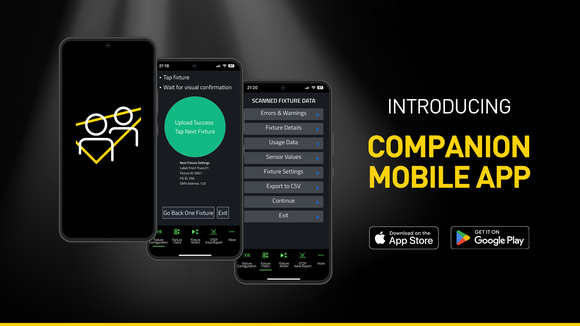
Companion Mobile er app-versionen af Companion-fixture-styring, firmware-upload og standalone-programmeringsværktøj. Det er kompatibelt med Martin NFC (Near Field Communication)-aktiverede fixtures, herunder MAC Viper XIP, MAC Aura Raven XIP, MAC Encore Two, ELP Manet 8F og mange flere fixtures, der er planlagt til fremtiden. Denne gratis app er tilgængelig til iOS- og Android-mobilenheder.

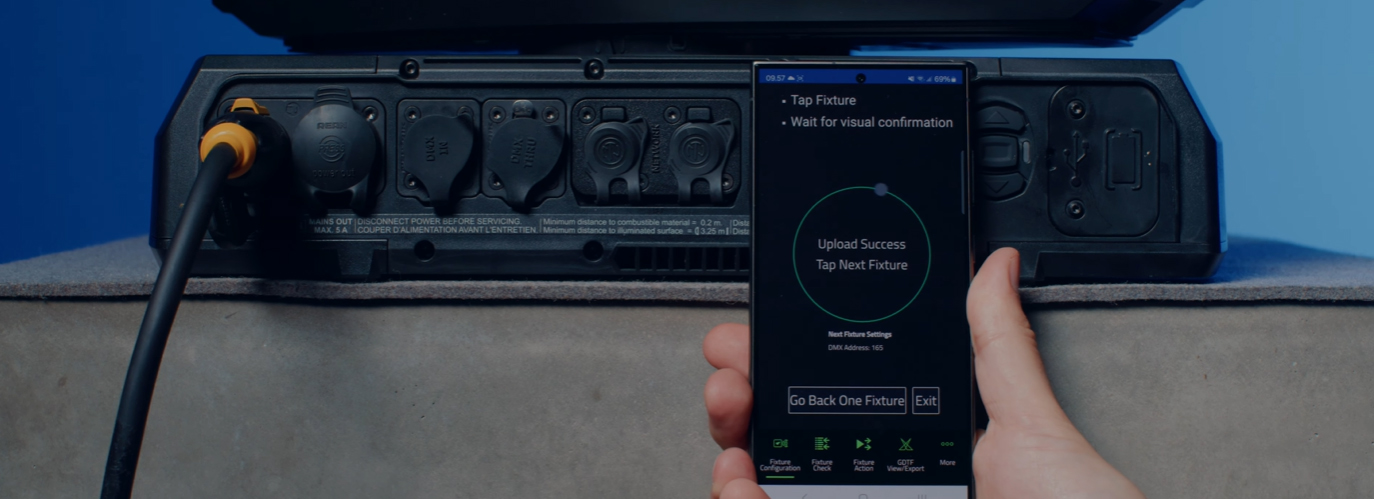
Selvom det ligner det populære Companion Desktop-program, bruger Companion Mobile NFC til at etablere trådløs kommunikation for yderligere at forenkle og lette fixture-konfiguration. Fordelen ved NFC-grænsefladen er, at fixtures kan konfigureres uden behov for at tænde dem. Selv når fixtures stadig sidder i deres flightcases, er alt hvad der skal til en simpel tryk med smartphonen mod fixture-displayet for at konfigurere fixtures.

Version 1.0.0 af Companion Mobile bringer fire vigtige funktioner med yderligere funktioner planlagt til fremtidige udgaver. Disse omfatter Fixture Configure-værktøjet til nem ændring af fixture-indstillinger, Fixture Check-værktøjet til hurtig fixture-diagnose, Fixture Action-værktøjet til start af simple fixture-handlinger og GDTF View & Export til browsing af Martin-fremstillede GDTF-filer for at slå fixture-detaljer op.

Companion Mobile synkroniseres med Martins bibliotek via internettet, hvilket eliminerer behovet for manuelle downloads. Derudover synkroniseres det automatisk med Martin-fremstillede GDTF-filer på GDTF-delingen. Dette giver adgang til alle fixture-detaljer såsom DMX-tilstande, DMX-kanallister, Gobo-loadouts og meget mere. GDTF-filer kan eksporteres direkte fra Companion til brug med enhver GDTF-kompatibel software.

Se også Companion Desktop, som tilbyder nogle af de samme funktioner til computere, der kører Windows.

Videoer


Funktioner

  • Compatible with Martin NFC-enabled fixtures, including MAC Viper XIP, MAC Aura Raven XIP, MAC Encore Two, ELP Manet 8F and many more fixtures to come
  • Automatic online synchronization of fixture database and GDTF library
  • Fixture Configure offers the ability to easily change the settings of one or multiple fixtures at once
  • Fixture Check enables the ability to quickly diagnose fixtures and export data to a CSV file
  • Fixture Action allows common tasks to be executed with a single click
  • Capability to read all data from fixtures, even when they are powered off
  • Capability to configure fixtures, even before powering them up
  • Includes an integrated GDTF viewer and export tool

Specifikationer

  • System Requirements

    Android: Version 12 or newer
    iOS: Version 13 or newer
    Storage: 250 MB available storage space

    Supported Fixture Communication Protocols NFC
    Supported NFC Parameters

    Fixture Configuration
    Patch: Label, Fixture ID, P3 ID, DMX Mode, DMX Address, DMX Universe, Compact Mode Aura, Pan Invert, Tilt Invert, Pan/Tilt Swap, PixelFlip, IP Address, Subnet Mask
    Universal Connect Module: SHoW ID, SHoW Key, Output Power, Antenna Type, RSSI, RX Quality, Connection State, Module Manufacturer, Module Model, Module Firmware
    Light and Colour: Dimmer Curve, Color Mode, Color Boost, Output Mode, Manual CTC, Manual Tint, Keylight Calibration, Gobo CT Correction, End Compensation, Video Tracking, Strobe Behavior, Tungsten Emulation
    Control: FollowSpot Mode, Pan/Tilt Speed, Effects Speed, Effects Shortcuts, Focus Tracking, Framing Mode, HyperZoom, Fan Mode, Cooling Mode, Studio Mode, BeamShaper, Fan Clean
    Display: Display, Display Show Errors, Display Rotation, Display Intensity, Display Contrast
    Power: Power Limit, Hibernation, Offline Mode, Stand-Alone Mode, Reset via DMX
    Outdoor: Auto Empty Water, Outdoor Actions
    Pan/Tilt Limits: Reset Pan/Tilt Limits, Enable Pan/Tilt Limits, Pan Limit Min, Pan Limit Max, Tilt Limit Min, Tilt Limit Max
    Details: Serial Number, RDM UID, MAC Address, RDM Protocol Version, RDM Device Model ID, Art-Net OEM Code, Product Category, Firmware Version, Sub-Device Count
    Service: SelfTest, Device Hours Total, Device Hours Resettable, Lamp Hours Total, Lamp Hours Resettable, Power Cycles Total, Power Cycles Resettable, Fixture Length

    Fixture Check
    Fixture Details: Serial Number, RDM UID, MAC Address, Firmware Version, RDM Device Model ID, Art-Net OEM Code
    Errors and Warnings: Error Messages, Warning Messages
    Usage Data: Device Hours Total, Device Hours Resettable, Lamp Hours Total, Lamp Hours Resettable, Power Cycles Total, Power Cycles Resettable
    Sensor Values: Temperatures, Fan Speeds
    Fixture Settings: same as fixture configuration

    Fixture Action
    Factory Defaults: Set Factory Defaults
    Reset Fixture: Warm Reset, Cold Reset
    Hibernation: Disable, Enable
    IP Settings: Reset IP Settings
    Pan/Tilt Limits: Reset Pan/Tilt Limits
    Outdoor Actions: Stop, Empty Head, Dry Off, Safe Parking
    Fan Clean: Stop, Start
    SelfTest: Stop, Test All, Test Pan/Tilt, Test Effects, Test LEDs, Identify
    Reset Counters: Reset Device Hours, Reset Lamp Hours, Reset Power Cycles

    * Not all parameters are supported by all fixtures

    Supported Fixtures - Fixture Configuration

    - ELP Manet 8F
    - MAC Aura Raven XIP
    - MAC Encore Two
    - MAC Viper XIP

  • Supported Fixtures - Fixture Check

    - ELP Manet 8F
    - MAC Aura Raven XIP
    - MAC Encore Two
    - MAC Viper XIP

    Supported Fixtures - Fixture Action

    - ELP Manet 8F
    - MAC Aura Raven XIP
    - MAC Encore Two

    - MAC Viper XIP

    Supported Fixtures - GDTF View & Export All Martin products
    Related Items

    Companion Desktop Software: Free download from www.martin.com

    Ordering Information

    Companion Mobile Software: Free download from App Store and Google Play

Downloads

Software
  Version Størrelse Uploadet
iOS download icon Companion Mobile - iOS (App Store)
version 1.0.3, udgivet: maj 2025
1.0.3   maj 2025
Android download icon Companion Mobile - Android (Play Store)
version 1.0.3, udgivet: maj 2025
1.0.3   maj 2025
Android download icon Companion Mobile - Android (Manual Installation)
version 1.0.3, opdateret: apr 2026
1.0.3   99,3 MB apr 2026

Hvis nogle af linksene ovenfor resulterer i mærkelige tegn i din browser, skal du højreklikke på filen for at gemme den på din computer.

Nyheder

HARMAN Pro Insights

Designing Smarter Workflows with Precision Lighting Fixture Management Tools feature

Designing Smarter Workflows with Precision Lighting Fixture Management Tools

    Professional lighting setups demand precise configuration, reliable diagnostics, and up-to-date firmware. Yet DMX addressing, firmware mismatches, and manual data entry often slow down designers, rental houses, and system techs. Effective lighting fixture management tools can eliminate these pain points and keep every show

CONTINUE READING

Support/FAQ

HARMAN Professional Solutions: